

New— MCP, AI UGC & Ad Creator

Make content
that converts.scales.sells.performs.

Automate to scale🚀

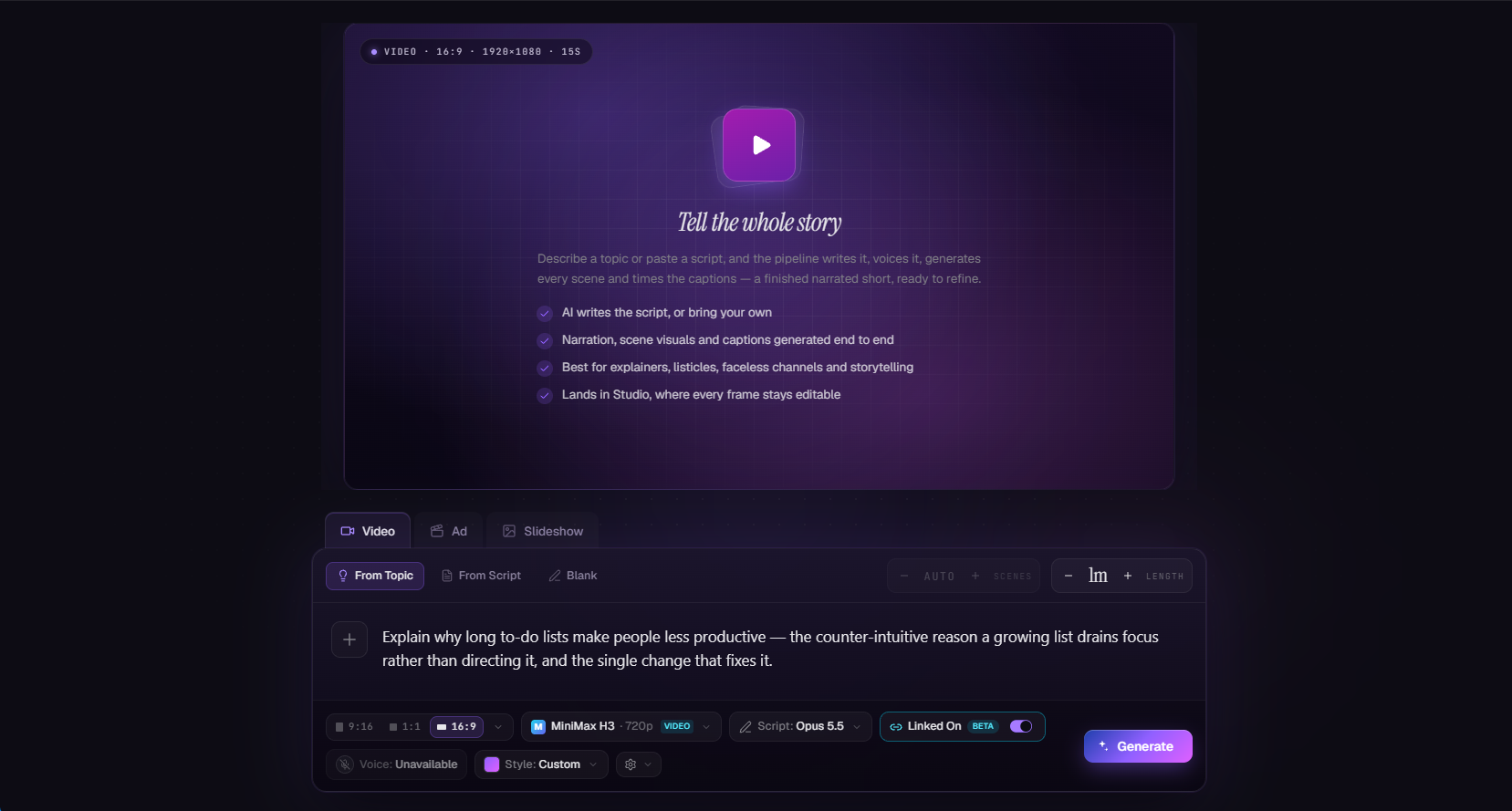
Turn a sentence into a professional AI video or slideshow — narration, visuals, captions, all handled. Then let TurboClip publish them to TikTok on autopilot.

Credit cost shown before every click You own everything you make Cancel anytime
UGC Ad · 9:16
UGC Ad · 9:16
Sentence → Video
Built for content on
TikTok
YouTube Shorts
Instagram Reels
Long-form/Faceless
LinkedIn Carousels
Sentence → Slideshow
Minutes
Idea → published video
90%
Less production time vs. manual
100+
Config knobs, zero needed to start
Zero
Surprise bills · credit cost shown before every click
One tool, not five

Every model. Every feature.
One subscription.

The newest AI models and a deep bench of production tools — video, ads, slideshows, editing, automation, and agent access — all inside TurboClip. Most tools do one of these.

The Real Cost

You didn't get into content
to become a full-time editor.

One 60-second video eats an entire afternoon. Scripts, voiceovers, B-roll, captions, exports. Then you do it again tomorrow. And the algorithm wants three a day.

3–5 hrs / video

Your afternoon, gone.

Script. Record. Edit. Caption. Export. Then repeat for the next one — and the one after.

$300/ freelancer

Or you hire it out.

Freelance editors, stock libraries, voice actors. It adds up fast — and none of them know your brand.

0posts missed

Consistency is the cheat code.

Everyone says "post daily." Nobody tells you how to sustain that for six months without burning out.

How it works

Four agents. One pipeline.

You write a sentence. Four specialized AI agents take it from outline to finished scenes — each tuned for its job, handing off to the next.

01

The Drafter

Researches your topic and structures a factual script in your chosen format — listicle, tutorial, story, explainer.

Hands offFactual outline
02

The Editor

Rewrites for tone, pacing, and platform. Applies hook strategies, trims filler, hits the duration target.

Hands offTuned script
03

The Segmenter

Splits narration into precisely timed phrases. Picks emphasis words. Knows where each beat lands.

Hands offTimed captions
04

The Visual Director

Drafts a composition for every scene — visual variety up front, narrative coherence end-to-end.

Hands offScene-by-scene visuals

All four run in minutes. You see every step — never a black box.

Made with TurboClip

One sentence in.
Scroll-stopping video out.

No camera, no editor, no stock footage. Every clip below was generated from a single prompt — the kind you'd type in the box below.

The prompt

None of this was filmed — the presenter, the voice, the studio. A hyper-real woman mid beauty-shoot reveals she was never real, then walks out into the working studio: every cut generated in TurboClip from one script.

Nobody in this ad exists.

AI Ad · 9:16
The TurboClip Engine

Generated in minutes.
Polished like a studio.

Most AI tools stop at generation. TurboClip hands you a full multi-layer editor the moment your first draft is ready — on desktop or straight from your phone — so you can ship fast and still sound like you.

01 — TurboClip Studio

Speed of AI. Control of a pro editor.

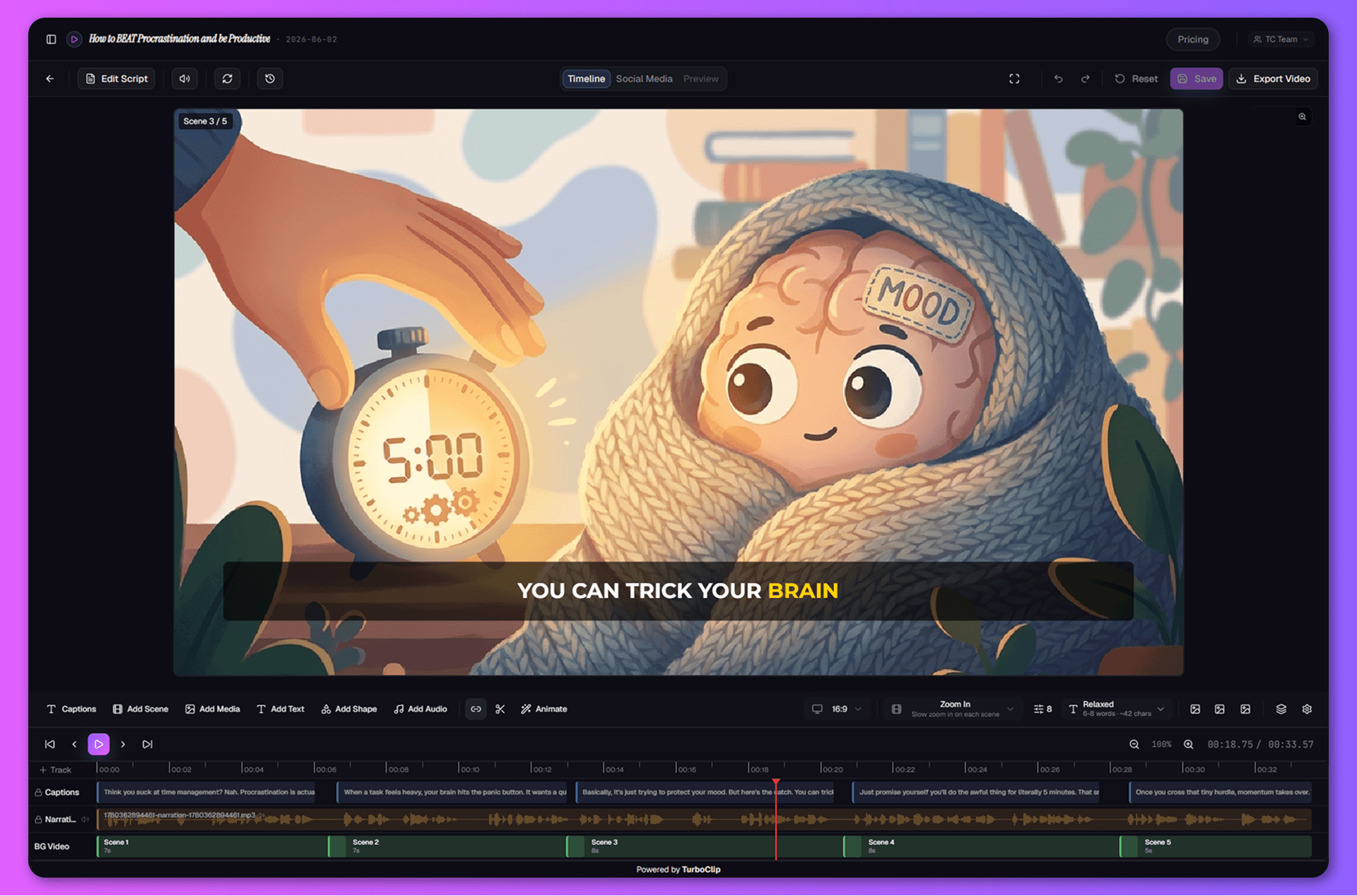
TurboClip Studiois the full multi-track timeline editor built right in — so the last 10%, where taste lives, stays yours. Animate a title, regenerate scene 3, fade the music under your CTA, nudge a word's timing. Ship something that's still you, without ever leaving the tab.

Multi-layer timeline

Video, images, text, and audio on unlimited tracks — trim, split, mix, and fade like a pro editor.

Iterate without penalty

Per-scene regeneration with full version history. Try a wild direction, roll back instantly.

TurboClip Studio — the multi-layer timeline editor with scene images, narration, captions, and overlays on editable tracks.

Keyframe animation with effects

Animate any layer — position, scale, rotation, camera zoom — with easing curves and one-click motion blur.

Static → video

Turn any scene into an AI video clip in one click.

AI Ad Creator

AI Ads.
Perfected.

UGC is the highest-converting ad format on paid social — and the most painful to produce: brief a creator, wait days for footage, edit, then do it all again for every variation. So we built an engine that generates the whole spot for you — with some of the most realistic AI presenters in the industry — ready to test.

Brief to finished ad

The whole UGC ad.
Generated end to end.

Hand TurboClip a brief and your product, and it generates the entire spot — an AI presenter speaking your script natively, your product in-hand, the b-roll, and the cuts between them, hook to CTA. Then it lands in TurboClip Studio to refine and export. No actors, no shoot, no studio day.

  • A complete ad, hook to CTAHook → product demo → result → CTA, with real close-ups and b-roll — generated and timed into one finished spot, not a single clip.
  • Your real product, in every shotUpload it once and it shows up recognizably — in-hand, on-pack, in use — staying consistent across every cut.
  • It speaks for itselfDialogue is voiced natively by the video model itself — genuine talking-to-camera delivery, lip-sync and all, that actually converts.
  • One seamless take, on demandFlip on Linked Mode and the whole spot renders as a single unbroken shot — no visible cuts, no edit seams.
  • Finished here, varied on tapRefine any shot in TurboClip Studio and export 1080p — no CapCut round-trip — then spin up fresh hooks and angles to A/B test. Generations, not reshoots.
02 — Narration that sounds human

A voice for every vibe.
Preview before you commit.

Browse a full library of studio-quality AI voices. Tap play, hear your narrator, lock it in. Change your mind after generation? Regenerate with a different voice — script and visuals stay put.

  • Multiple quality tiers — economy for drafts, premium for final cuts.
  • Instant audio preview — no more guessing how a voice will read your script.
  • Word-level caption sync, baked into every export.
Brian · US Male
CONVERSATIONAL · ENERGETIC
Riley · UK Female
WARM · EDUCATIONAL
Nova · US Female
BRIGHT · TIKTOK-READY
Atlas · Deep Male
DOCUMENTARY · CINEMATIC
03 — Grounded in your data

Your brand. Your facts.
Not generic AI slop.

Upload product specs, course material, brand guidelines. Drop in reference images so every visual lands on-brand. TurboClip grounds the script in your facts and the visuals in your aesthetic — not whatever the model half-remembers from the internet.

  • Brand-consistent visuals — start/end frames + up to 5 style references. Every scene matches your aesthetic.
  • Data Sources (RAG) — upload docs, AI cites your facts.
  • Pick your AI— mix & match top-in-class models per project.
DATA SOURCES · 4 ATTACHED
brand-voice-2026.pdf
1.2 MB
TONE
product-one-pager.docx
847 KB
FACTS
customer-research.pdf
3.4 MB
CLAIMS
launch-talking-points.md
12 KB
HOOKS
Script grounded in 4 sources · 0 hallucinated claims
AI Slideshows

Not just video.
A whole slideshow suite.

Photo carousels quietly out-reach video on TikTok and Instagram — cheaper to make, and the algorithm keeps pushing them. The catch? Building them by hand is death by a thousand slides. So we built a second engine that does the heavy lifting.

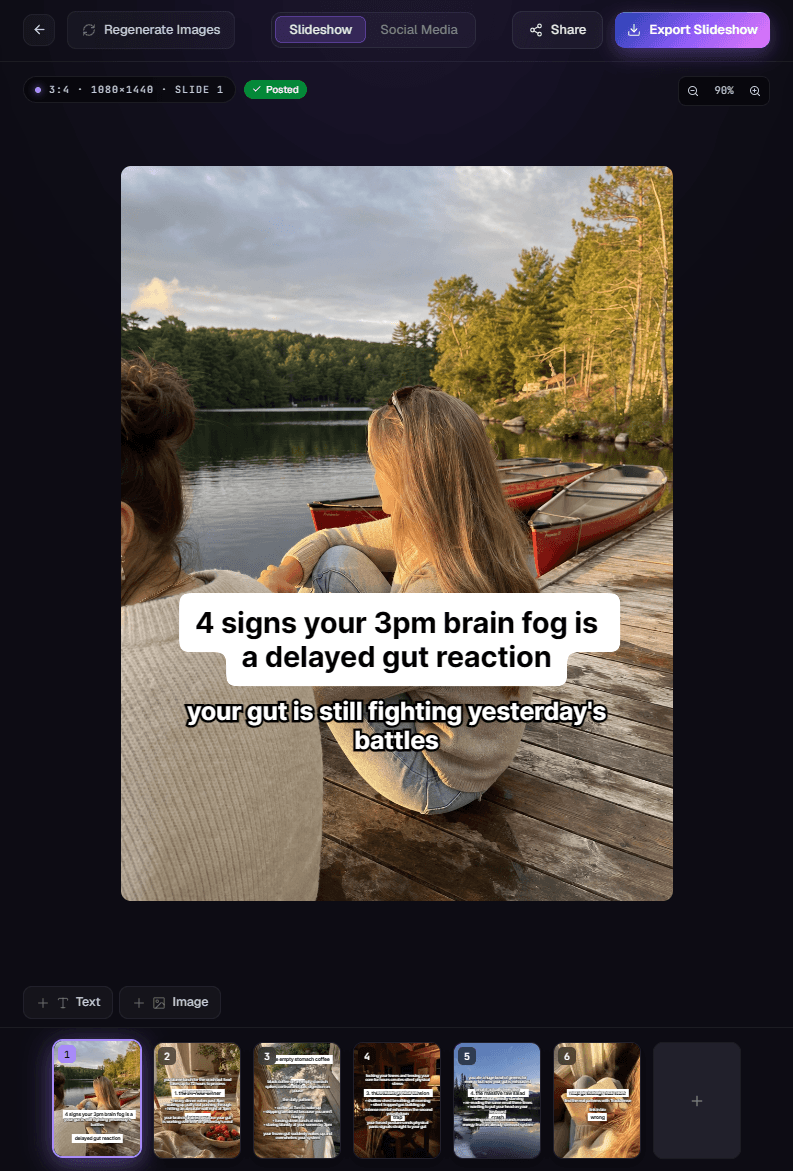
The TurboClip slideshow editor — an AI-written hook over an on-brand generated background, with the slide filmstrip below.
Hook-writing AI

The hardest line to write.
Written for you.

Drop in an idea and the slideshow flow writes the scroll-stopping opener, lays out every slide, and generates the imagery to match — all on brand. You just refine and post.

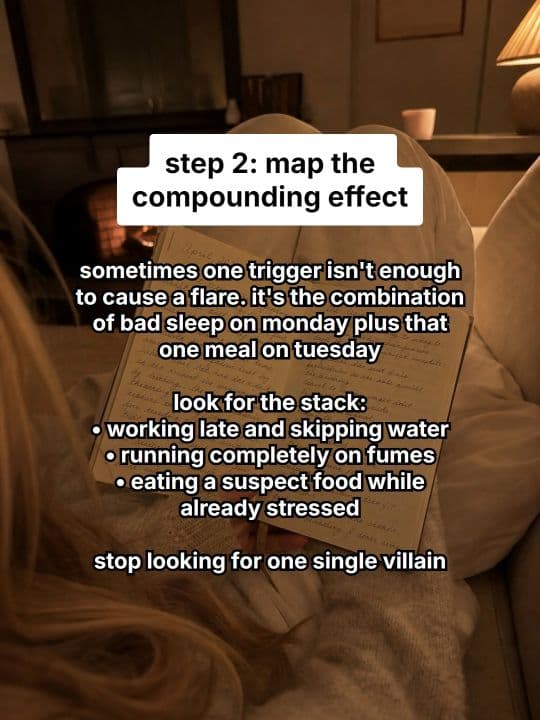
  • Scroll-stopping hooks, written for youNot a fill-in-the-blank template — real, psychology-driven angles like “4 signs your 3pm brain fog is a delayed gut reaction.” The opener that earns the swipe.
  • On-brand imagery, zero stockEvery slide gets an AI-generated background matched to your niche — fresh visuals each post, never the same recycled stock.
  • Edit any slideRewrite the text, swap the image, reorder the deck — full per-slide control with version history. Speed of AI, polish of a designer.
  • Post-ready for TikTok & InstagramExported at the right size, ready to publish. Want it hands-off? Automations can generate and post a fresh carousel for you daily — more below.
Built-in Social Toolkit

Generate it. Then ship it everywhere.

Thumbnails, captions, hashtags, every aspect ratio — generated alongside your video so you can post the moment it's done. And every asset lands in a media library you can organize and generate from directly.

AI Cover Images

Professional thumbnails with text overlay, generated from your scenes. Multiple style options, same brand feel.

Title, Description & Hashtags

Platform-optimized social copy auto-written from your script. One click, copy-all, paste, post.

Every Aspect Ratio

9:16, 16:9, 1:1, 4:5 — every major platform format from a single project.

Media Library & Collections

Every asset organized into collections — plus a built-in generator to create new AI images and video clips on the spot. No project required.

Slideshow Automations

Set it up once.
Post forever.

Define your niche, tone, and style in plain English. TurboClip generates an entire content template — then drops fresh, on-brand slideshows into your TikTok inbox on the schedule you pick, ready to post in a tap. Stop missing your posting window — every post is queued and waiting when it's time.

1Set it up

Describe your niche.
Get a full content engine.

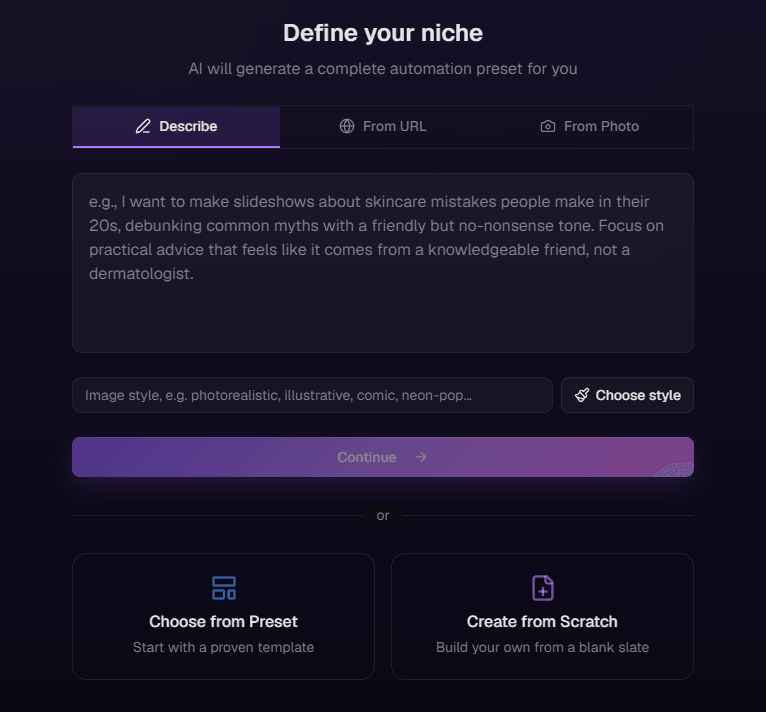
Tell TurboClip what you make and it builds the entire template — narrative direction, format rules, image style, and caption design. Review, tweak, hit go.

  • Three ways to start — describe your niche in plain English, paste a competitor or inspiration URL, or upload reference screenshots.
  • AI Niche Generator — a complete, production-ready preset back in seconds.
  • Or a ready-made template — handpicked for common niches, every field still yours to tweak.
TurboClip's niche setup — describe your niche, paste a URL, or upload screenshots to auto-generate a complete automation preset.
2Then it runs itself

Then it queues up.
On repeat. On brand.

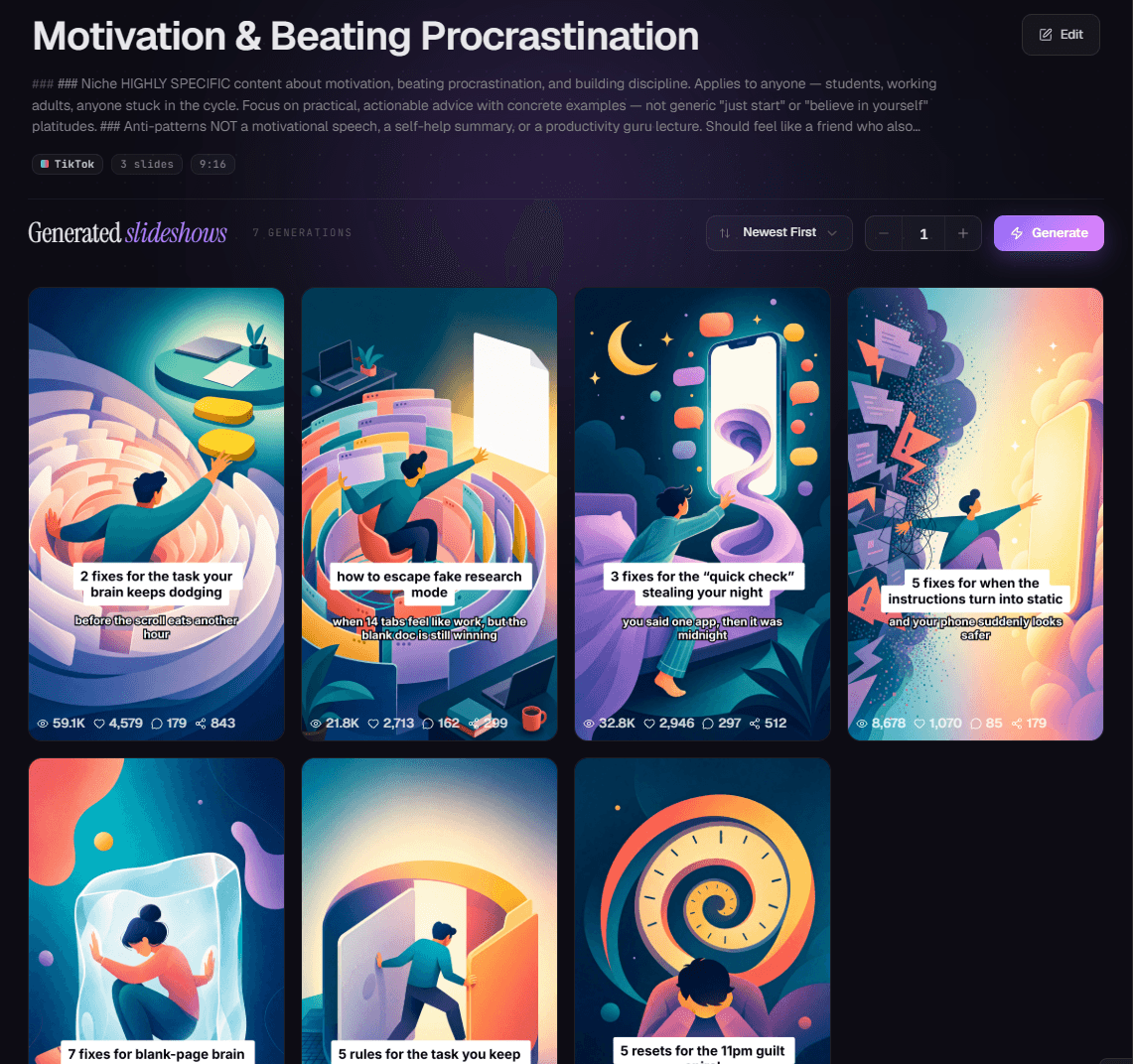
Connect TikTok once and pick your slots. Every slideshow your automation generates is queued and dropped into your TikTok inbox on schedule — a fresh angle each time. Come back to an inbox of ready-to-post drafts, each one a single tap from live.

  • TikTok auto-scheduling — connect once; ready-to-post drafts land in your inbox on your weekly schedule (e.g. Mon–Fri · 9am / 3pm / 8pm), a tap from live.
  • Every slideshow is unique — same brand, fresh angle, every single time.
  • Analytics built in — views, likes, and shares per post to steer the next round.
  • Run an agency? One automation per client niche — five brands, one operator, all on-brand.
A running TurboClip automation and the on-brand slideshows it has generated over time.
TurboClip MCP · New

The content engine for agents.

One connection through MCP, and TurboClip lives inside the chats you already use — Claude, ChatGPT, Cursor. No new app to learn: your AI just gains a content studio.

Your AI already writes the script. Now it ships the rest — a finished, ready-to-post video, UGC ad, or slideshow, handed straight back in the chat. No app-switching, no editor, no shoot.

Building a product instead of connecting an agent? The same engine is a REST API — typed schemas, a live sandbox, and the exact cost quoted before a credit moves.

Create a UGC ad for my cold brew subscription
Make a 30-second video on the 12-3-30 workout
Turn this blog post into a 6-slide carousel
Works with any MCP client
ClaudeChatGPTCursorClaude Code
Early signals

Early signals from teams creating with TurboClip.

Reactions from our private-beta creators, agencies, and educators — the first wave putting TurboClip to work.

“I set the niche up once and now there’s a week of carousels waiting in my TikTok inbox most Mondays. I still rewrite the odd hook, but I’m not starting from a blank page.”

Faceless finance creator
Early access
Slideshow automations

“One automation per client niche, so nothing bleeds between brands. Took an afternoon to set up properly — but in that same afternoon I got through a month of content for eight of them.”

Social-media agency
Private beta · 8 client brands
Multi-brand workspaces

“I uploaded my course notes as a data source half expecting it to ignore them. The explainers come back using my actual material, not whatever it assumed I meant.”

Online nutrition educator
Early access
Data sources (RAG)

“With most tools you get one export and if it’s wrong, it’s wrong. Here I can go back in and redo the one scene that didn’t land — which I do more often than I’d like to admit.”

Short-form fitness creator
Early access
Studio

“I gave it a product photo and got back an ad with a presenter who actually speaks. The first one came out a bit stiff, but the third I’d genuinely run as a paid ad.”

DTC drinks brand
Founder · private beta
AI Ad Creator

“I type a sentence and a few minutes later there’s a finished captioned video sitting there. Getting started was always the bit that stopped me — now I’ve got more drafts than I can post.”

Daily self-improvement creator
Early access
Idea → video in minutes
Under the hood

Powered by the best models in AI.

TurboClip isn’t a wrapper around one model. It routes every step to the model that does it best — OpenAI, Google, ElevenLabs, ByteDance — and the day a better one ships, it’s in your dropdown.

Script
Opus 5 · GPT-5.6 Sol · Gemini 3.1 Pro
Research-grounded, on-format scripting
Narration
ElevenLabs
50+ natural, expressive voices
Imagery
GPT Image 2 · Nano Banana (3 Pro)
Styled per scene, up to 4K
Motion
Gemini Omni Flash · Veo 3.1 · Seedance 2.0 + 2.5 · Kling V3
AI video with native audio
New models added as they launch — you always create on the current frontier.
Pricing

Studio-quality content.
Without the studio budget.

Know the exact cost before you spend a thing. Every plan is credit-based — pay per video, not per seat, with no surprise bills or locked-in video counts. Spend credits however you want, cancel anytime.

Hot🔥50% off Seedance 2.5Until end of August
Starter
For beginners exploring AI creation
$15/mo
billed monthly
Start for $1
Make your first video for $1
then $15/mo · cancel anytime
2,500 credits / month
  • Up to 7 AI video ads
  • Up to 22 short-form videos
  • Up to 50 slideshows
  • Up to 167 images
  • Up to 5 long-form videos
  • Video models (Gemini Omni Flash · Veo 3.1 · Seedance 2.0 + 2.5 · Kling V3)
  • SFX & background music
  • Content automations
  • TikTok auto-publishing & scheduling
  • Data sources (RAG)
  • API & MCP access
  • Per-scene regeneration & history
  • All generation models
  • Timeline & canvas editors
  • Unlimited exports & social tools
  • Unused credits roll over
  • Priority support
  • Multi-brand team workspaces
  • Early access to new models
  • Highest-res video — Veo 3.1 4K & Seedance 2.0 1080p
Pro
For power users & small teams
$79/mo
billed monthly
Start for $1
Make your first video for $1
then $79/mo · cancel anytime
16,000 credits / month
  • Up to 50 AI video ads
  • Up to 138 short-form videos
  • Up to 320 slideshows
  • Up to 1067 images
  • Up to 35 long-form videos
  • Video models (Gemini Omni Flash · Veo 3.1 · Seedance 2.0 + 2.5 · Kling V3)
  • SFX & background music
  • Content automations
  • TikTok auto-publishing & scheduling
  • Data sources (RAG)
  • API & MCP access
  • Per-scene regeneration & history
  • All generation models
  • Timeline & canvas editors
  • Unlimited exports & social tools
  • Unused credits roll over
  • Priority support
  • Multi-brand team workspaces
  • Early access to new models
  • Highest-res video — Veo 3.1 4K & Seedance 2.0 1080p
Cancel anytime No lock-in. Manage in your settings.
Credits never expireCreator & Pro credits roll over each cycle.
Real humansEmail, chat, and Discord on Creator+.
Need more? Credit packs start at $4.99 / 400 credits. Refer friends to earn up to 50% off for a year.
FAQ

Questions, answered.

What is TurboClip?
TurboClip is an AI-powered content creation platform that turns a simple text description into professional videos and image slideshows — ready to publish on any social platform.
Our multi-stage AI pipeline handles scriptwriting, narration, visual generation, captioning, and assembly. You get four core tools: AI Video Generation for fully narrated videos, the AI Ad Creator for UGC-style ads where an AI presenter speaks your script to camera, AI Slideshow Generation for social carousels and stories, and Content Automations that let you define a template once and generate unlimited variations.
The result is polished, publish-ready content in minutes instead of hours.
How does it work?
Describe your content. Type a topic, idea, or full script into a single text input. That’s the only required step — everything else is optional.
Configure your preferences. Choose your target platform, video length, aspect ratio, delivery tone, voice, AI models, and more. Or just use the defaults and go.
Click generate. Our AI pipeline takes over — a Drafter researches and scripts, an Editor refines for tone and pacing, a Segmenter creates timed captions, and an Art Director generates imagery for every scene. A video is ready in minutes; a slideshow in seconds.
Edit and refine. Open TurboClip Studio — the full multi-track timeline editor — to regenerate individual scenes, adjust timing, add overlays, tweak captions, or change the narrator — all without starting over.
Export and share. Download your video in 1080p with baked-in captions, or export slides as JPG. TurboClip also generates social media descriptions, hashtags, and cover images for you.
How long does it take to make a video?
Minutes. A full narrated, captioned video is typically ready in a couple of minutes; a slideshow in seconds. The same thing by hand — scripting, voiceover, sourcing visuals, editing, captioning — takes most creators hours.
Let the pipeline run end-to-end and come back to a finished draft, or review at each step. Either way, the slow part of content creation is gone.
What makes TurboClip different from other AI video tools?
Most AI video tools produce a one-shot output — take it or leave it. TurboClip generates a complete first draft, then gives you TurboClip Studio, a full multi-track timeline editor, to refine every scene, caption, and overlay. It’s the speed of AI generation combined with the control of a professional editor.
You also get per-scene regeneration with version history — don’t like one scene? Regenerate just that image with a custom prompt and compare versions. Convert any static scene to an AI video clip. And our automation system lets you define a content template once and generate unlimited unique variations with a single click.
No other tool combines AI video, AI ad creation, slideshows, professional editing, content automation, and agent access in one platform — most do just one of these, and charge more for it.
And you see the exact credit cost before every click — no opaque “it depends” — so a plan goes further than you’d expect: our most popular plan makes roughly 50 videos or 120 slideshows a month. That’s the kind of value that makes shopping around feel like a chore.
Can TurboClip make AI ads with a presenter?
Yes — it’s a whole product. The AI Ad Creator generates complete AI ads — UGC-style spots, product placements, and commercials — where an AI presenter speaks your script to camera, voiced natively by the video model rather than dubbed over with a separate narrator. That native, talking-to-camera delivery is what actually converts.
Start from a brief — describe your product, angle, and audience — or paste your own ad script. The AI plans a timecoded shot list (hook → demo → result → CTA), you edit and approve it, then review each rendered shot on its own and regenerate any one until it lands. No actors, no shoot, no studio day.
Every ad finishes in TurboClip Studio. And because the whole ad is generated, spinning up a fresh hook or angle is just another generation — produce a week of ad creative and A/B test the winners for a fraction of what a single UGC creator or ad-production tool would charge.
Can I put my own product in an AI ad and keep it consistent?
Yes. Upload a photo of your actual product and it shows up recognizably — in-hand, on-pack, in use — in every shot, while a single anchor image keeps the same presenter and the same product consistent across every cut. No drifting faces, no morphing packaging.
Flip on Linked Mode and the shots stop being cuts entirely: the whole ad plays as one unbroken, continuous take with no visible seams — the scroll-stopping single-shot look, generated end to end.
Can AI agents like Claude create content with TurboClip?
Yes — TurboClip is the content engine for agents. Connect it to Claude, ChatGPT, or Cursor over the Model Context Protocol (MCP) and your agent turns a plain prompt into finished, ready-to-post content — narrated and captioned videos, UGC-style ads, and image slideshows — rendered in minutes, right inside the chat.
Connect in one click by signing into your TurboClip account, or drop in an API key — both act on your own plan and credits. Agent access is available on the Creator plan and up.
Can I choose the AI models it uses?
Yes. TurboClip is model-agnostic — every stage of the pipeline runs on frontier, best-in-class AI models, and you pick which to use per project based on your budget and quality needs.
That choice spans scripting & vision, image generation, video animation, and voice — reach for fast, economical models while drafting and premium models for the final cut. And because we're never tied to one provider, the day a better model ships, we add it — you're always on the current frontier without lifting a finger.
Do I need editing or design skills?
Not at all. TurboClip is designed so anyone can go from an idea to a finished video or slideshow without any technical skills. Type what you want, click generate, and you’re done.
But if you want more control, it’s there. Behind the simple starting point are 100+ configuration options — platform, format, tone, audience, pacing, AI models, reference images, data sources, and production notes. TurboClip Studio gives you scene-by-scene control over every detail. Beginners never need to touch these; power users can tune everything.
Can I keep my content on-brand?
Yes — this is one of TurboClip’s strongest features. Upload reference images (start/end frames and up to 5 style references) to guide the AI’s visual output and maintain a consistent look across all your content.
You can also upload data source documents — product descriptions, brand guidelines, research, lesson plans — and the AI will ground its scripts in your actual data rather than general knowledge. This means factually accurate, brand-consistent content instead of generic AI output.
Can I make sure the content is factually accurate?
As accurate as the information you give it. Upload your own data sources — product specs, research, brand guidelines, notes — and the AI writes from *your* facts, not generic guesses.
For anything it’s unsure of, it can research reputable sources on the web to get the detail right. So instead of confident-sounding filler, you get content that holds up — the difference between something you can publish and something you have to fact-check first.
Can I reuse my own images, clips, and products across projects?
Yes — everything lives in your Media Library. Upload your own images and videos or save anything you generate, organize it into collections (brand assets, characters, product shots), and pull any of it into any video, ad, slideshow, or automation with the built-in picker.
You can even generate new AI images and clips right inside the library — no project required — so your brand asset pack, b-roll, and product shots are always one click away.
What platforms and formats does it support?
TurboClip supports all major social platforms including TikTok, YouTube Shorts, Instagram Reels, YouTube long-form, and LinkedIn — with automatic aspect ratio suggestions for each (9:16, 16:9, 1:1, 4:5, and more).
For video, you get 1080p exports with baked-in captions in any aspect ratio. For slideshows, export individual slides as JPG or download all at once as a ZIP archive. Both include AI-generated social media descriptions, hashtags, and cover images to make publishing fast.
Is TurboClip good for faceless YouTube channels?
It's one of the best fits. A faceless channel runs on a repeatable pipeline — script, voiceover, visuals, captions — with no camera and no on-screen presence. That's exactly what TurboClip produces from a single prompt: a researched script, natural narration from 50+ studio-quality AI voices, AI scene visuals in a style you lock in, and timed captions — exported as 1080p video with baked-in captions.
You build these in TurboClip Studio — generate the script, narration, and visuals, then fine-tune the pacing before you export. It's the whole faceless pipeline in one place, so the channel keeps shipping without you ever touching a mic or a camera. For long-form, we recommend image-based video for the economics.
Can I make long-form videos — 10 minutes or longer?
Yes. Long-form is a core use case — from quick clips right up to full 10-minute videos, narrated and captioned end to end. For anything this long, we strongly recommend building it as image-based video: scenes rendered from AI image models rather than AI video models.
The reason is cost. Image-based scenes are far cheaper per minute, so a 10-minute piece stays economical — whereas AI video-generation models are priced for short, motion-heavy clips (ads, hero shots) and get expensive fast at that length. Image-based long-form is ideal for faceless YouTube channels, educational explainers and tutorials, documentaries and deep-dives, listicles and top-10s, and story-time or narration videos — all exported as 1080p with baked-in captions.
How does a Content Automation actually work?
You set it up once. Describe your niche in plain English (or paste a competitor URL, or upload a few reference screenshots) and TurboClip builds a complete template — narrative direction, format rules, image style, and caption design — that you can tweak field by field.
From then on it runs itself: on the schedule you pick, it generates a fresh, on-brand slideshow for every slot — vertical, short-form, and built for TikTok, Instagram, and Facebook — a new angle each time, keeping your queue full. Turn on “keep my schedule filled” and it even generates ahead of time so a slot is never empty.
Will every slideshow stay on brand — and can I keep the same character?
Yes to both. Lock in an image style (or a saved style preset) and turn on consistent styling so every slide matches. Your uploaded products and mood-board references carry through as reusable brand assets.
For a recurring character — an AI influencer, a mascot, a founder — add them as a labelled Subject Reference and set how often they appear (every slide, most slides, hook only, or let the AI decide). It's a built-in setting, no code or API required. Same face, same brand, a fresh scene every time.
Do I stay in control of what gets made?
Completely. This is a human-in-the-loop engine, not a black box. Everything an automation generates is yours to review and edit — rewrite any slide's text, swap or regenerate an image, reorder slides, all with version history.
On schedule, each finished slideshow is queued and ready to post — auto-scheduled to your connected TikTok, or exported to post on Instagram and Facebook — so nothing goes live without you, and your analytics tell you what to double down on next.
Can it really auto-post to TikTok?
Yes. Connect your TikTok account once, set a weekly schedule (e.g., Mon–Fri at 9am, 3pm, 8pm), and every slideshow your automation generates enters a publish queue.
It will go live at the next available slot — complete with an AI-generated title, description, and hashtags baked in.
Who owns the generated content?
You do, fully. TurboClip never claims rights to your output.
Your projects are private by default, and we never train our internal models on your personal data.
Can I manage multiple brands or clients?
Yes — spin up a team for each brand and keep its projects, automations, connected TikTok account, and credits fully separated. Switch between them without logging in again, and even run different brands in separate browser tabs at once, with no risk of posting to the wrong account.
It’s built for agencies and creators running more than one channel. Available on the Creator plan and up.
How do credits work and what exactly am I paying for?
TurboClip uses a simple, transparent credit system. Every AI action — scripting, narration, image creation, video animation — has a fixed credit cost displayed before you click generate. No surprises, no hidden fees.
Everything else is completely free: video rendering, 1080p exports, timeline editing, adding overlays, saving projects, and generating social media descriptions never cost credits.
Founder-led support at TurboClip
Founder-led

You'll be talking to the people who built it.

TurboClip is founder-run. Hit a wall, want a feature, or just want a second pair of eyes on your first ad? Real humans answer — not a ticket queue that forgets you by Monday.

You own the copyright to everything you make Private by default We never train our models on your content
Stop editing. Start shipping.

Your next 10 videos
start with one sentence.

Pick a plan, type your first sentence, and watch a finished video render in minutes.

generous credits · cancel anytime · 1-click export