Turn a photo into marble, ice or chocolate: 10 AI prompts
Ten prompts that remake any photo in a new material: marble, chocolate, chalk, balloons, porcelain, mosaic, ice, pixel art, hedge and sand. Each is ready to copy, beside the before and after it made.
What's your photo made of? Ten photos, each remade in a new material with one short prompt: a skater carved in marble, a ballerina in ice, a grand castle that turns out to be a sandcastle. Every prompt is below, ready to copy. Add your own photo, paste one in, and it comes back in that material, with the same framing and pose.
The 10 prompts
Each picture shows the photo on the left and its remake on the right.
Eight are word for word the prompts that made the pictures. Two are worded for any photo: ours said "the cat too" for the chalkboard, and "the low angle" for the castle.
1. Marble statue
A polished white marble statue in a gallery, every fold of cloth carved in stone. It suits portraits, sport and anything you want to look timeless.
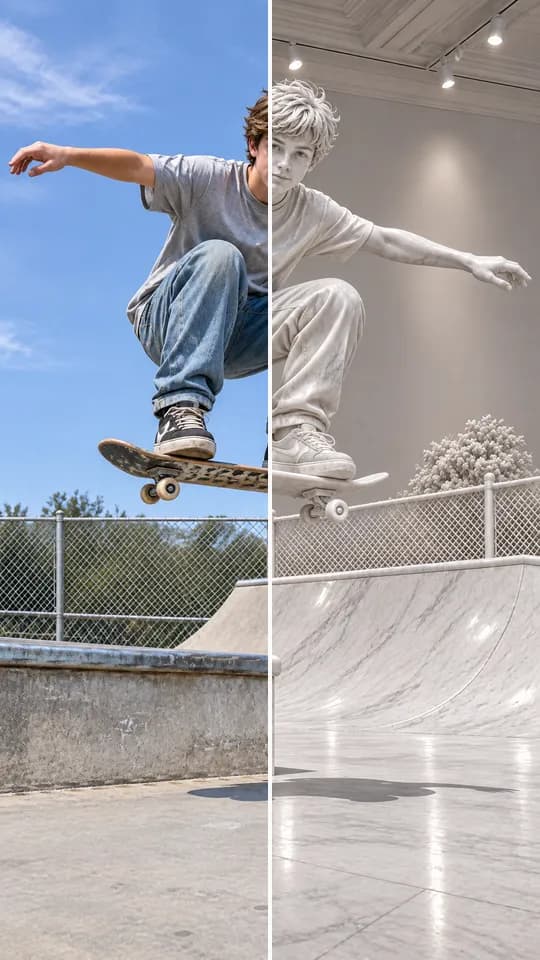
Remake this photo as a polished white marble sculpture in a gallery. Keep the framing, the pose and where everything sits exactly as in the photo.

No text, no lettering, no logos, no watermark, no border or frame round the picture.
2. Chocolate
Moulded and polished chocolate, down to the latte art. It suits food, cafés and anything sweet.
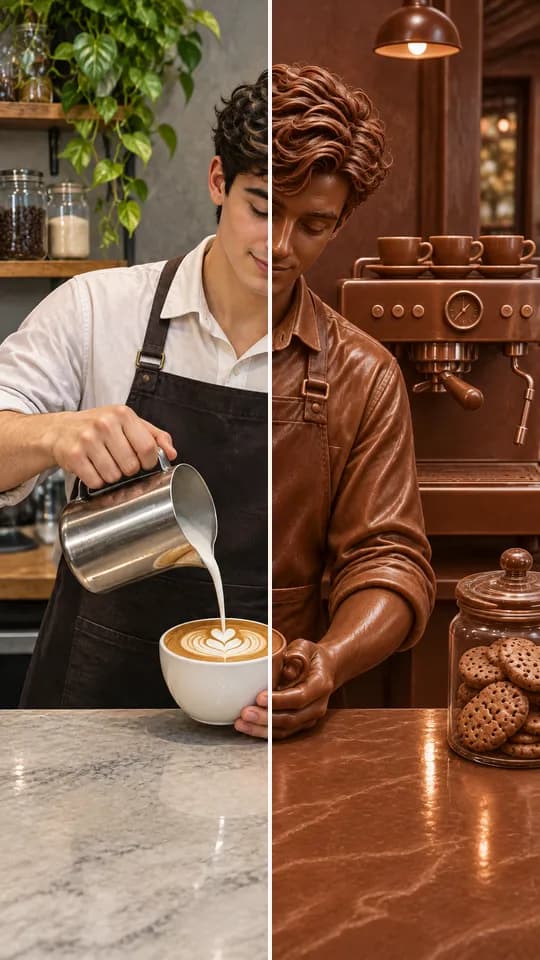
Remake this photo as a sculpture made of chocolate. Keep the framing, the pose and where everything sits exactly as in the photo.

No text, no lettering, no logos, no watermark, no border or frame round the picture.
3. Chalkboard
A coloured-chalk drawing on a dusty classroom blackboard. It suits pets, homes and anything cosy or nostalgic.
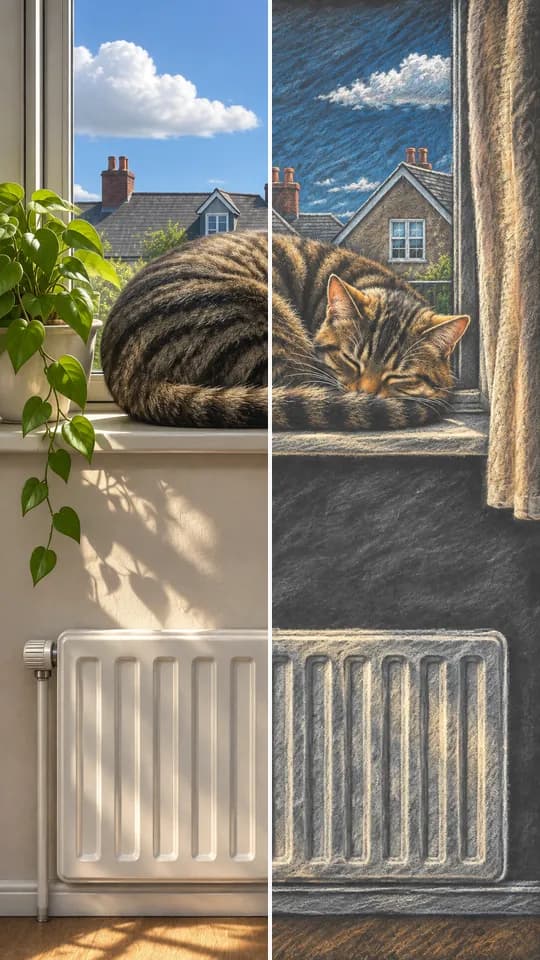
Redraw everything in this photo, every person and animal too, as a coloured-chalk drawing on a dusty classroom blackboard. Keep the framing, the pose and where everything sits exactly as in the photo.

No text, no lettering, no logos, no watermark, no border or frame round the picture.
4. Balloon art
Twisted from glossy balloons, down to the clouds and the grass. It suits pets, parties and anything playful.
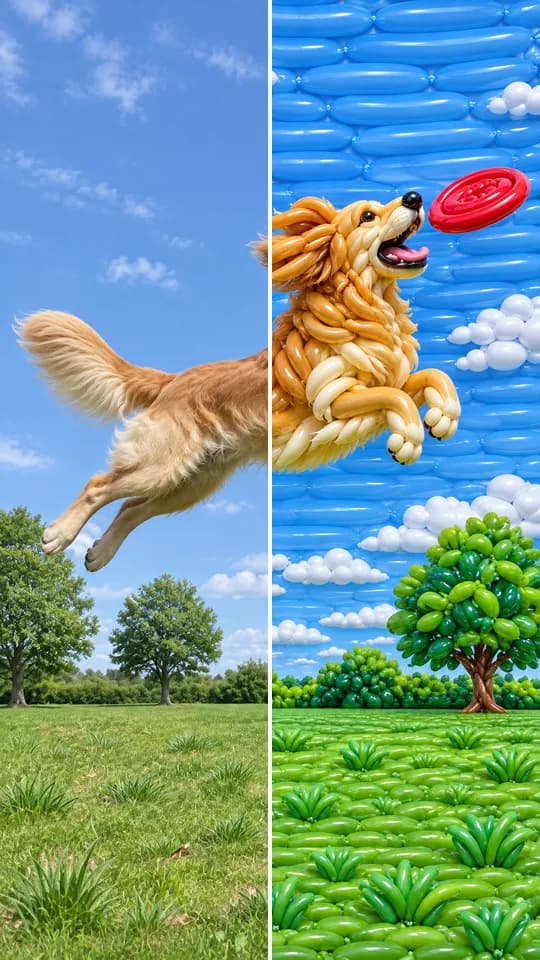
Remake this photo as balloon art, twisted from glossy balloons. Keep the framing, the pose and where everything sits exactly as in the photo.

No text, no lettering, no logos, no watermark, no border or frame round the picture.
5. Blue porcelain
Blue-and-white glazed porcelain, painted in cobalt. It suits portraits, fashion and heritage brands.
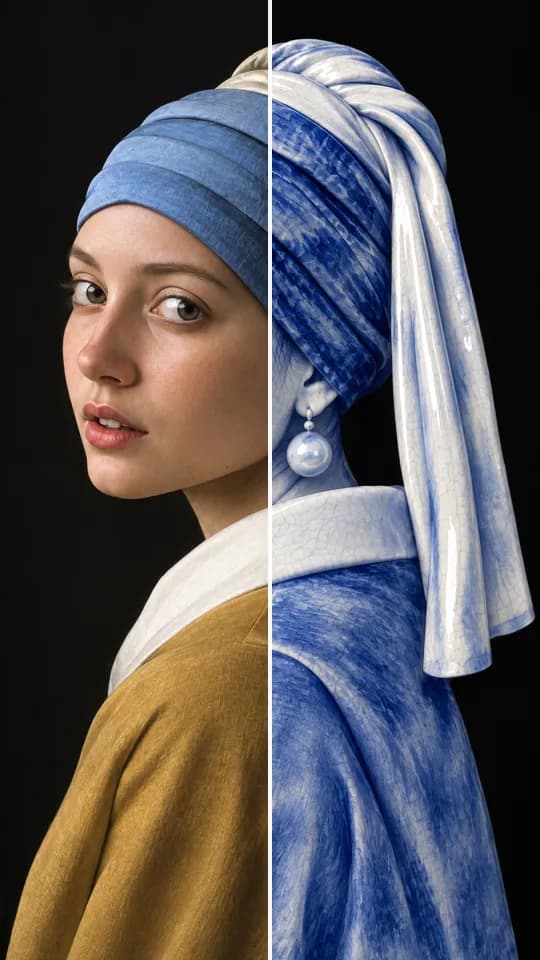
Remake this photo as blue-and-white glazed porcelain. Keep the framing, the pose and where everything sits exactly as in the photo.

No text, no lettering, no logos, no watermark, no border or frame round the picture.
6. Roman mosaic
An ancient Roman mosaic of small stone and glass tiles. It suits food, travel and history.
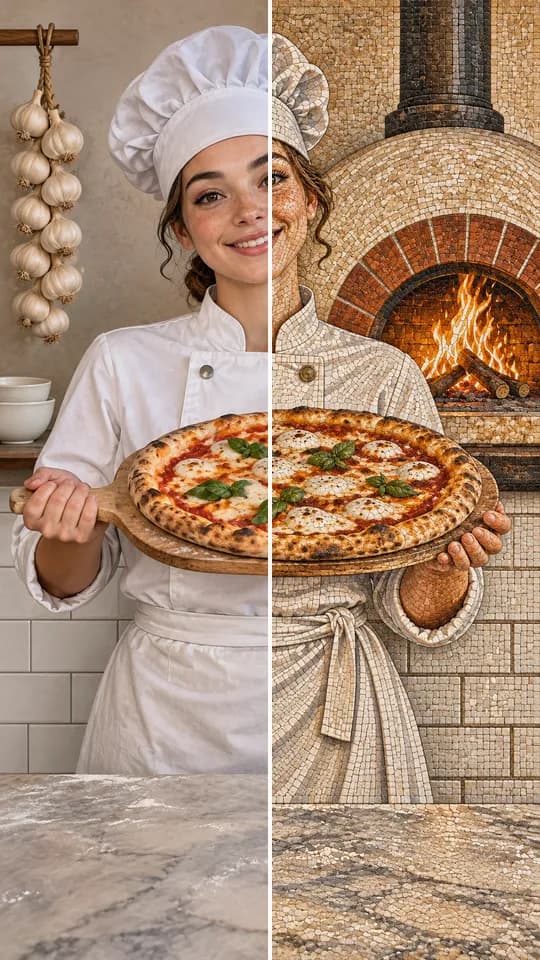
Remake this photo as an ancient Roman mosaic. Keep the framing, the pose and where everything sits exactly as in the photo.

No text, no lettering, no logos, no watermark, no border or frame round the picture.
7. Ice sculpture
Carved from clear ice, the light catching every edge. It suits portraits, dance, fashion and winter.
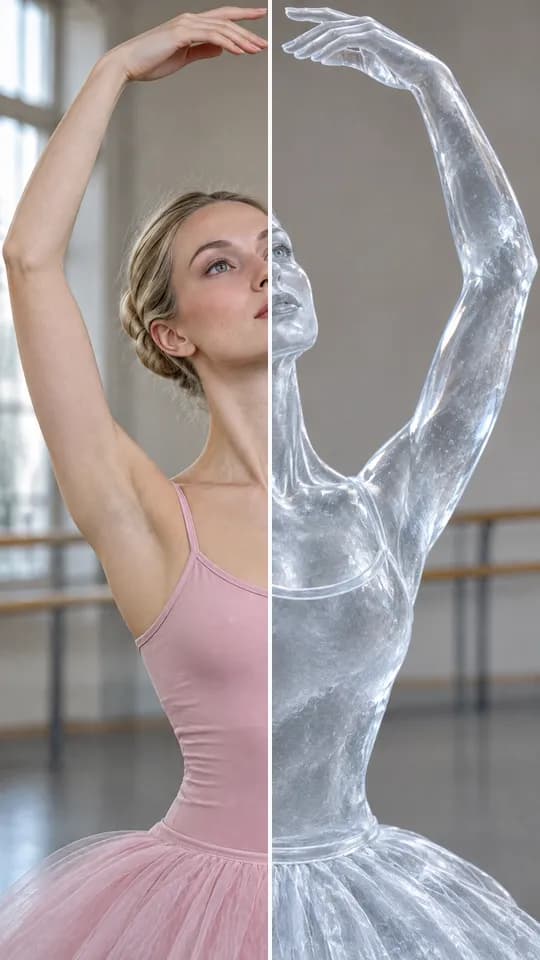
Remake this photo as an ice sculpture. Keep the framing, the pose and where everything sits exactly as in the photo.

No text, no lettering, no logos, no watermark, no border or frame round the picture.
8. Pixel art
Chunky 16-bit pixel art, like a scene from a retro video game. It suits gaming, nostalgia and family photos.
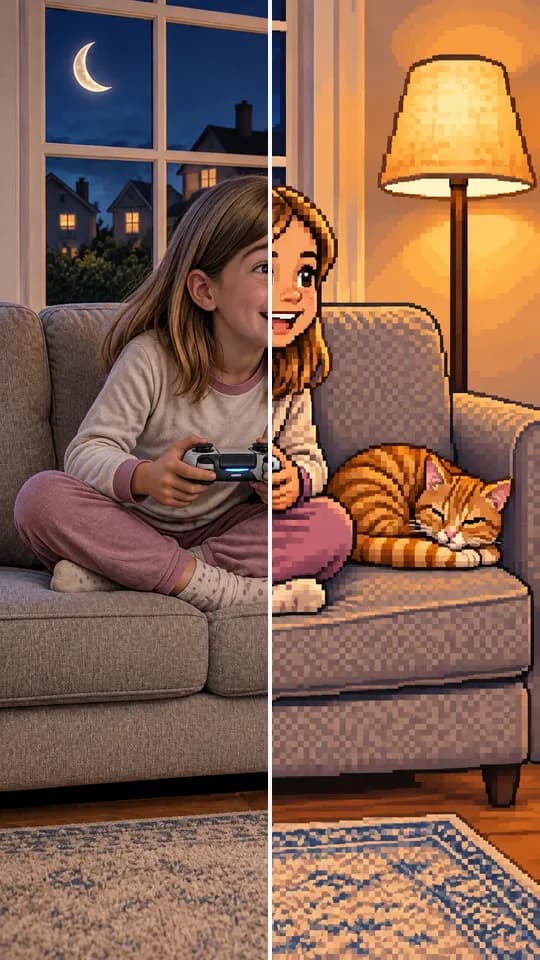
Remake this photo as chunky 16-bit pixel art, like a scene from a retro video game. Keep the framing, the pose and where everything sits exactly as in the photo.

No text, no lettering, no logos, no watermark, no border or frame round the picture.
Pixel art is also built in to TurboClip for whole videos, as #pixel-art.
9. Topiary
Clipped from green hedge, as in a formal garden, with the sky left real. It suits gardens, the outdoors and a playful twist.
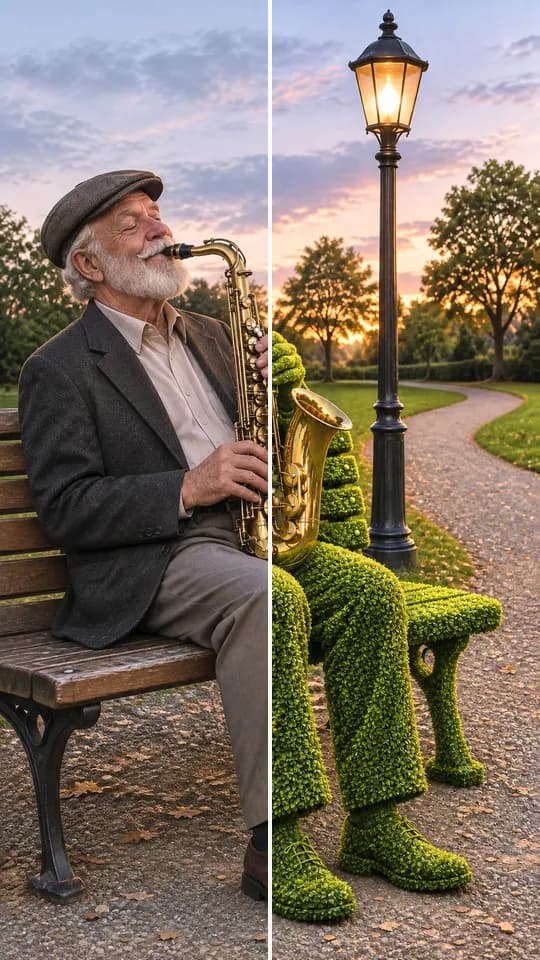
Remake this photo as topiary, clipped from green hedge. Keep the framing, the pose and where everything sits exactly as in the photo.

No text, no lettering, no logos, no watermark, no border or frame round the picture.
10. Sandcastle
A sandcastle on the beach, with a bucket and spade for scale. Try it on a grand building: it suits travel, landmarks and a joke.
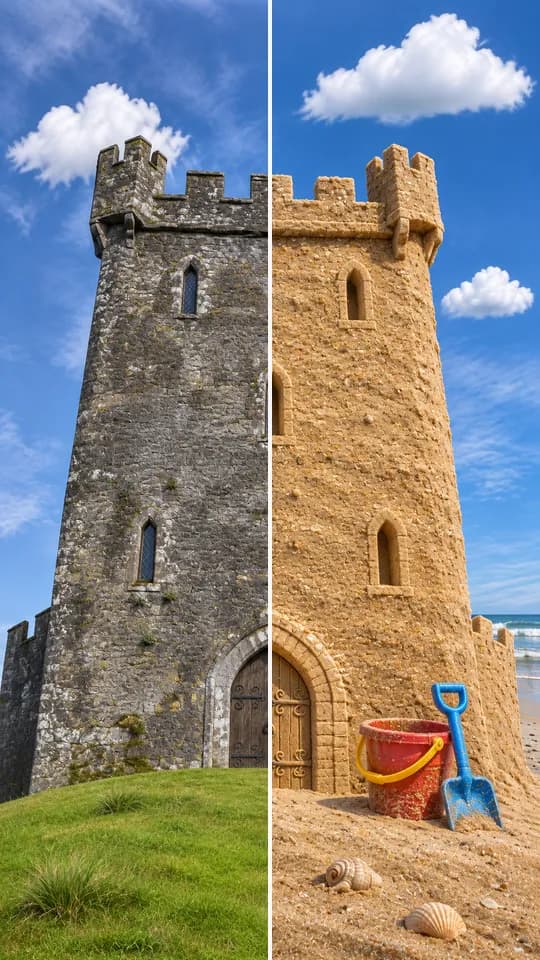
Remake this photo as a sandcastle on the beach, a bucket and spade beside it. Keep the framing, the angle and where everything sits exactly as in the photo.

No text, no lettering, no logos, no watermark, no border or frame round the picture.
Use a prompt on your own photo
In Create image
- In TurboClip, open Create image and pick GPT Image 2.6 Sunburst.
- Add your photo with +, as the reference image.
- Paste a prompt from this page and generate. TurboClip shows the price first.
In Claude, ChatGPT or another assistant
Connect TurboClip once. Then attach your photo to the chat and paste a prompt, and the assistant makes the picture with TurboClip after showing you the price. It works in Claude, ChatGPT, Codex, Cursor and any assistant that takes MCP connectors.
Make a prompt your own
Each prompt has three parts:
- "Remake this photo as …" names the material. Swap it for any you like: gold, knitted wool, toy bricks.
- "Keep the framing …" holds your photo's layout, so the remake lines up with it. Keep it as it is.
- The last line keeps words and logos out of the picture.
A photo with one clear subject and a simple background gives the boldest result.
How the Reel's pictures were made
Each scene began as a black-and-white line sketch, so the photo and its remake share one layout and line up when the wipe crosses. GPT Image 2.6 Sunburst turned each sketch into the photo, then remade the photo with the prompt above it, with Claude and the TurboClip connector.
With your own photo you skip the sketch: add the photo and paste the prompt.
Questions & answers
Can I use these prompts on my own photo?
Yes, that's what they're for. Add your photo as the reference image, paste a prompt and generate. Every prompt asks to keep the framing and the pose, so the remake lines up with your photo.
Which AI model made the pictures?
GPT Image 2.6 Sunburst, in TurboClip. The prompts are plain words, so they work with other image models that take a reference photo too.
Can I use them in Claude or ChatGPT?
Yes, once TurboClip is connected. Attach your photo, paste a prompt, and the assistant shows the price, then makes the picture with TurboClip.
Can I choose my own material?
Yes. Change the words after "Remake this photo as" to any material you like, such as gold, knitted wool or toy bricks, and keep the rest of the prompt as it is.
What does a picture cost?
Each picture uses credits, and TurboClip shows the price before anything is made. Ours were 7 credits each with GPT Image 2.6 Sunburst at its standard size, the photo included.