A stop-motion Christmas ad from one product photo, with the prompt
One product photo and one prompt made this 15-second stop-motion Christmas ad, sound and all. The whole prompt is here to copy, shot by shot, with how to make it with your own product.
Felt villagers turn a bottle of body oil into their town's Christmas tree: the lights go round, the star goes on, a mitten pulls the switch and the whole square lights up. It took one photo of the product and the prompt below, in a single 15-second generation with its own sound.
The brand is made up. Swap in your own product and keep the rest.
The prompt
Word for word, the prompt that made the ad. @Element1 is the product photo: in TurboClip it stands for the reference image you add.
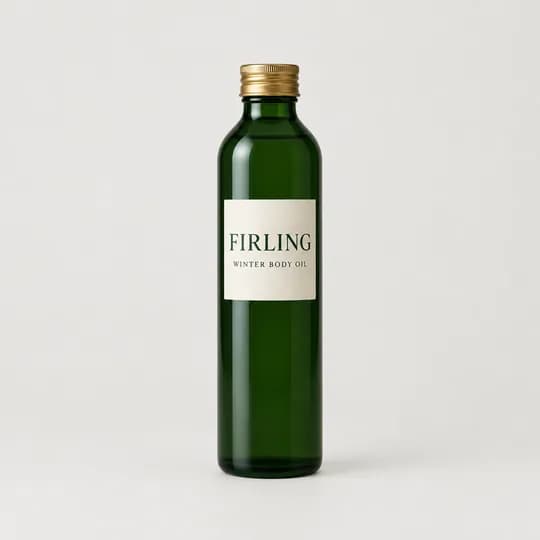
A 15-second handmade stop-motion Christmas advert for the bottle in @Element1, FIRLING Winter Body Oil. Seven shots, hard cuts on the beat.

SHOT 1 (0:00–0:02) — FIRST LIGHT
• EFFECT: Rack focus + falling snow
• Macro: a felt rooftop under knitted snow at night. Focus pulls to a window as it lights up warm.
• Hard cut on the beat.

SHOT 2 (0:02–0:04) — THE SQUARE
• EFFECT: Slow crane down
• Wide: a felt village square deep in snow. In its middle stands the glass bottle from @Element1, as tall as the houses, unlit.
• Hard cut.

SHOT 3 (0:04–0:06) — THE LIGHTS
• EFFECT: Macro, stop-motion on twos
• Tiny felt hands wind a string of dark fairy lights round the bottle's glass shoulders, the label clear behind them.
• Hard cut.

SHOT 4 (0:06–0:08) — THE STAR
• EFFECT: Low angle + a small wobble
• A villager on a wooden ladder sets a gold paper star on the cap. It wobbles, then sits.
• Hard cut.

SHOT 5 (0:08–0:10) — THE SWITCH
• EFFECT: Snap push-in + held stillness
• A red mitten grips a big brass lever switch on a felt post. Everything holds for one beat; only the snow moves. The mitten pulls the lever down.
• Hard cut on the click.

SHOT 6 (0:10–0:13) — LIGHTS ON
• EFFECT: Light cascade + bloom. The SIGNATURE shot
• Every bulb lights, spiralling up the bottle from base to star, glinting in the glass. Gold light floods the snow; the villagers throw up their arms.
• Slow pull back.

SHOT 7 (0:13–0:15) — THE HERO
• EFFECT: Slow push-in to a held end frame
• The lit glass bottle centred, label sharp and facing camera, star bright, snow falling. Hold.

LOOK
Needle-felted puppets, wool and felt sets, cotton-wool snow: everything but the bottle. Stop-motion on twos with a slight handmade jitter. Macro lens, shallow depth of field. Warm gold light against a cold blue night. Real miniatures, not CGI.

PRODUCT
The bottle is @Element1 in every shot, and the only thing in the film not made of felt: real, glossy deep forest-green glass that catches the lights, a brushed-gold screw cap, a cream label reading FIRLING / WINTER BODY OIL. Same shape and proportions. No re-lettering, no label drift.

SOUND
A music-box melody over soft sleigh bells, wool-soft foley, a hush before the switch, one bright chime as the lights come on. No voice, no lyrics.

EFFECTS INVENTORY
• Rack focus: 1x, shot 1. Opens on texture
• Camera moves (crane, push-in, pull back): 4x, shots 2, 5, 6, 7
• Stop-motion on twos: throughout. The handmade signature
• Held stillness: 1x, shot 5. The breath before the payoff
• Light cascade + bloom: 1x, shot 6. The SIGNATURE effect
• Hard cuts on the beat: 6x, between every shot

DENSITY MAP
0:00–0:04 = LOW (rack focus, crane)
0:04–0:10 = MEDIUM (macro, wobble, push-in, held stillness)
0:10–0:13 = HIGH (cascade, bloom, pull back, crowd)
0:13–0:15 = LOW (push-in, hold)

ENERGY ARC
Act 1 (0:00–0:04): a quiet night; the village wakes.
Act 2 (0:04–0:10): the build. Lights, star, switch, a held breath.
Act 3 (0:10–0:15): the lights come on and the film settles on the bottle.
Shot by shot
The prompt asks for seven shots, each with the seconds it should take. Here each one sits beside a frame of the shot it made. The model kept the order and most of the timing, and played the lights coming on and the final frame as one shot from 10 seconds, so the times below are where each shot really is in the ad.
1. First light
In the ad: 0 s to 1.8 s.
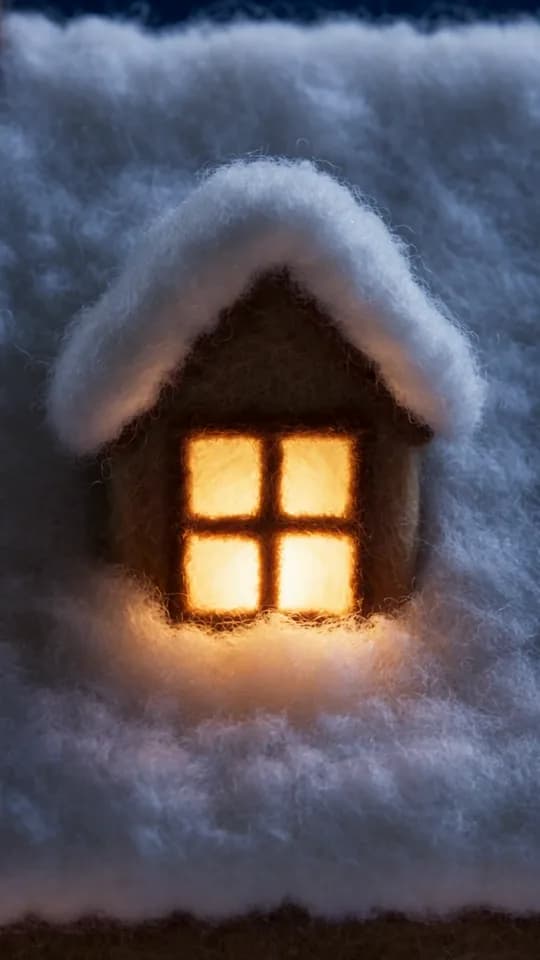
• EFFECT: Rack focus + falling snow
• Macro: a felt rooftop under knitted snow at night. Focus pulls to a window as it lights up warm.
• Hard cut on the beat.
2. The square
In the ad: 1.8 s to 3.8 s.
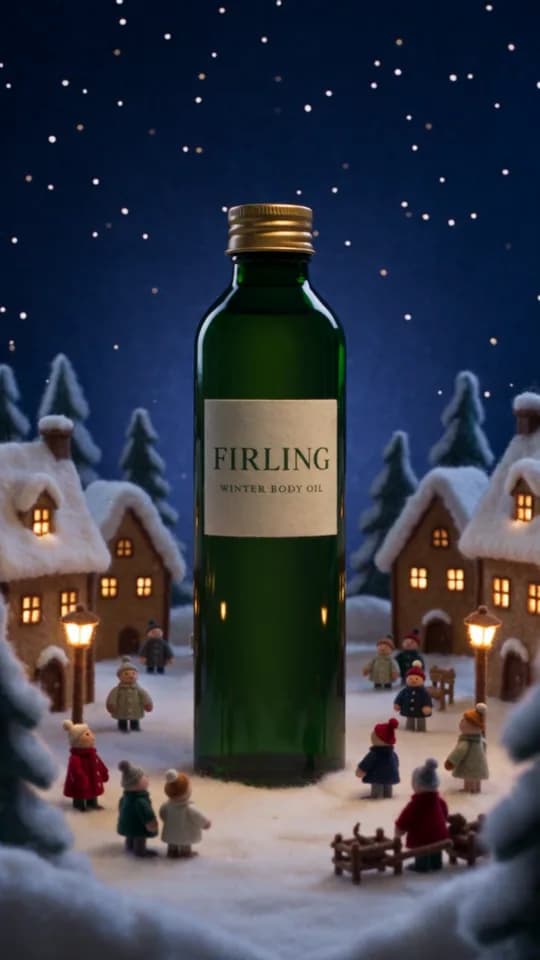
• EFFECT: Slow crane down
• Wide: a felt village square deep in snow. In its middle stands the glass bottle from @Element1, as tall as the houses, unlit.
• Hard cut.
3. The lights
In the ad: 3.8 s to 5.9 s.
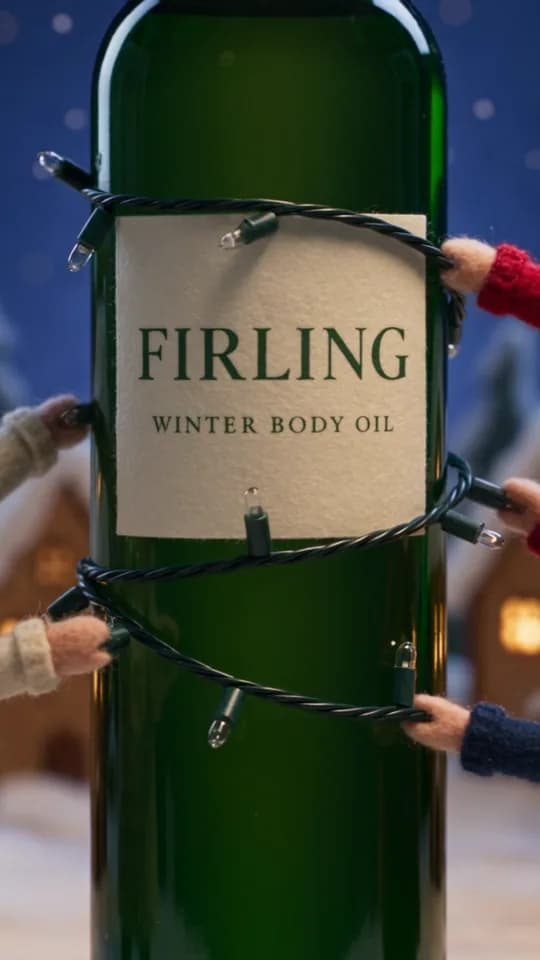
• EFFECT: Macro, stop-motion on twos
• Tiny felt hands wind a string of dark fairy lights round the bottle's glass shoulders, the label clear behind them.
• Hard cut.
4. The star
In the ad: 5.9 s to 7.8 s.
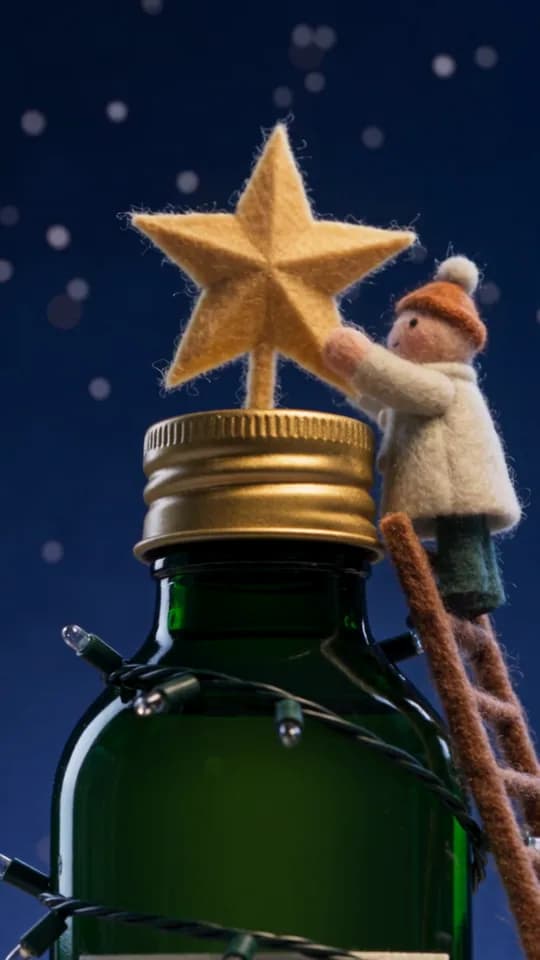
• EFFECT: Low angle + a small wobble
• A villager on a wooden ladder sets a gold paper star on the cap. It wobbles, then sits.
• Hard cut.
5. The switch
In the ad: 7.8 s to 10 s.
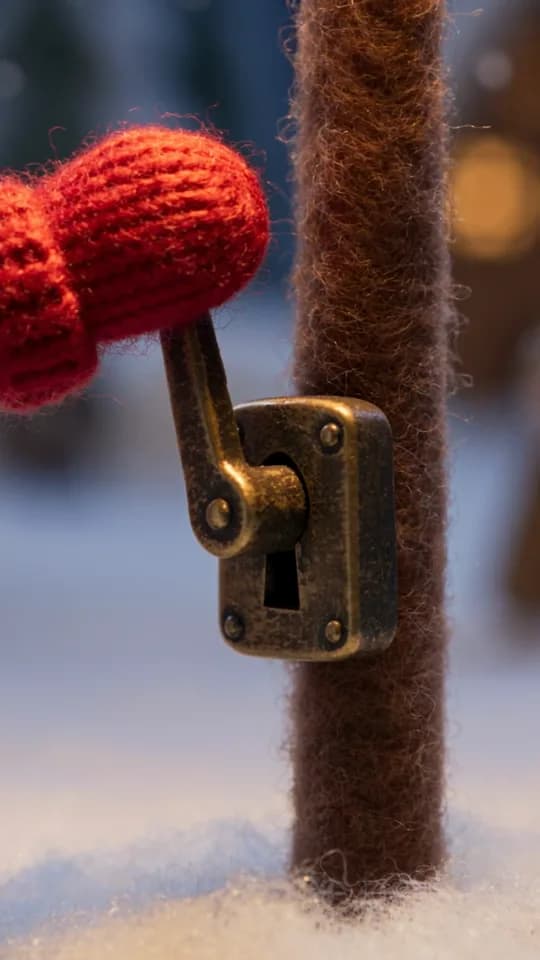
• EFFECT: Snap push-in + held stillness
• A red mitten grips a big brass lever switch on a felt post. Everything holds for one beat; only the snow moves. The mitten pulls the lever down.
• Hard cut on the click.
6. Lights on
In the ad: 10 s to 12.4 s.
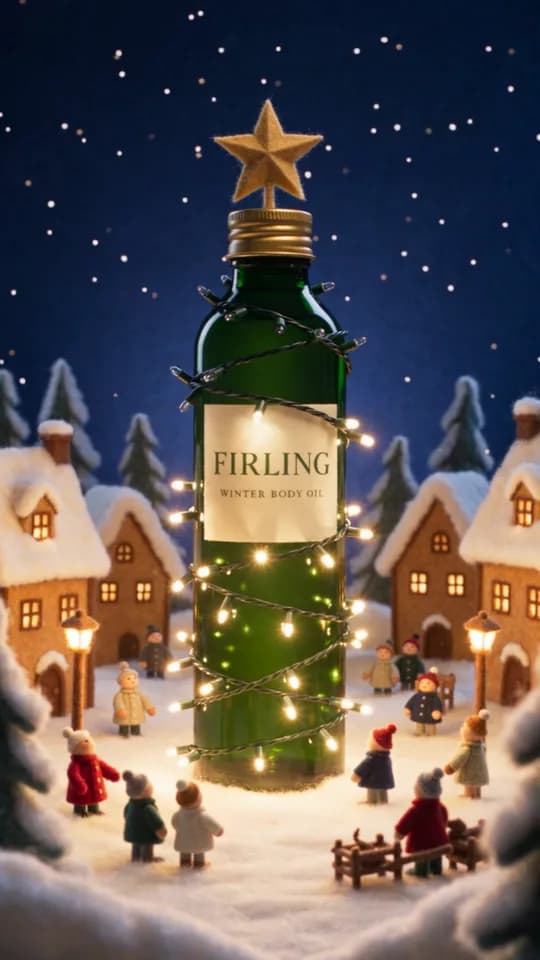
• EFFECT: Light cascade + bloom. The SIGNATURE shot
• Every bulb lights, spiralling up the bottle from base to star, glinting in the glass. Gold light floods the snow; the villagers throw up their arms.
• Slow pull back.
7. The hero
In the ad: 12.4 s to 15 s.
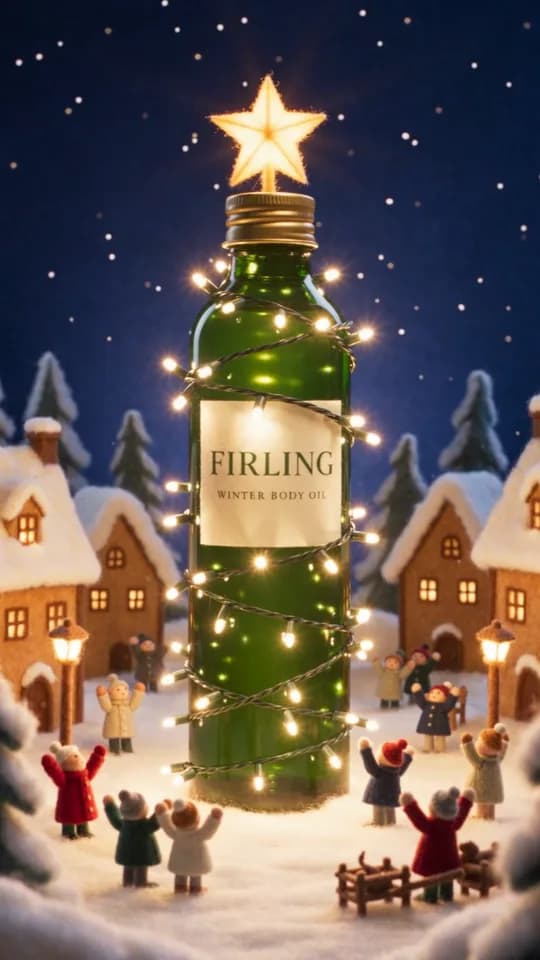
• EFFECT: Slow push-in to a held end frame
• The lit glass bottle centred, label sharp and facing camera, star bright, snow falling. Hold.
What the rest of the prompt does
- The opening line. Says what to make: a 15-second stop-motion Christmas ad for the product in the photo, in seven shots with hard cuts on the beat.
- Look. Sets the medium for everything but the product: felt, wool and cotton-wool snow, stop-motion with a handmade jitter, a macro lens, and warm gold light against a cold blue night.
- Product. Keeps the product true in every shot: its glass, its gold cap and the words on its label, and makes it the only thing in the film not made of felt. Rewrite this one for your own product.
- Sound. Asks for the ad's sound, made in the same generation: a music box, sleigh bells, a hush before the switch and a chime as the lights come on.
- Effects inventory. Lists every effect and the shots it is in, so the model sees the whole edit at once.
- Density map. Says where the ad is busy and where it is calm, so the big moment has room.
- Energy arc. Tells the ad's story in three acts: a quiet night, the build, and the payoff.
Make it with your own product
- Take a photo of your product on a plain background, with the whole product in frame and its label easy to read.
- Change the product's name in the first line, and rewrite the Product paragraph for yours: what it is made of, its colours, its cap or lid, and the words on its label.
- If your product isn't tall, change how it stands in the square in shot 2 and where the lights go in shot 3.
- Leave
@Element1as it is. In TurboClip it stands for the photo you add. - In Create video, pick Seedance 2.5, set 15 seconds and 9:16, add your photo as the reference image, paste the prompt and generate.
In another video tool, write "the product in the reference image" wherever the prompt says @Element1.
Open Create video with Seedance 2.5
In Claude, ChatGPT or another assistant
Connect TurboClip once, then give the assistant your product photo and the prompt. It shows the price, then makes the ad. It works in Claude, ChatGPT, Codex, Cursor and any assistant that takes MCP connectors.
How it was made
| Video model | Seedance 2.5 |
| Length and shape | 15 seconds, 9:16, 720p |
| Sound | Made in the same generation as the picture |
| What it was given | One product photo as its reference image, and the prompt |
| What it cost | 394 credits, $3.94 at pay-as-you-go prices (23 Nov 2026) |
| The product photo | Made with GPT Image 2.5. The brand is made up |
Questions & answers
Can I use this prompt with my own product?
Yes. Add a photo of your product as the reference image, change the product's name in the first line and rewrite the Product paragraph to describe it. The rest of the prompt works as it is.
Will I get the same ad?
Not frame for frame. Each generation is new: the shots, their order and the product's look hold, and the details change. If a shot misses, generate again.
Which AI model made it?
Seedance 2.5, as a 15-second, 9:16 clip at 720p, with its sound made in the same generation. The product photo was made with GPT Image 2.5.
What is @Element1?
It stands for the photo you give the model. In TurboClip, leave it in the prompt as it is. In another video tool, write "the product in the reference image" in its place.
What does it cost?
Ours cost 394 credits, $3.94 at pay-as-you-go prices, on 23 November 2026. TurboClip shows the price before anything is made, and it depends on the model, the length and the resolution.
Can I use it in Claude or ChatGPT?
Yes, once TurboClip is connected. Give the assistant your product photo and the prompt, and it shows the price, then makes the ad with TurboClip.