How to make a slideshow on TikTok







How to make a slideshow on TikTok, step by step. Then automate it, with a fresh slideshow for your niche written, designed and sent to your TikTok drafts.
The quick answer: in the TikTok app, tap +, then Photo, then Upload, and pick up to 35 photos. Tap Next, add text and a sound, and post. That's one slideshow. If you want a new one every day, the hard part isn't posting it, it's making it, and that part can be automated.
How to make a slideshow in the TikTok app
TikTok calls a slideshow a photo post. From TikTok's help center:
- Tap Add post (+) at the bottom of the app.
- Tap Photo, then Upload, and pick your photos. You can add up to 35.
- Tap Next. Swipe between the photos to add text, stickers or a filter, or to crop one, and add a sound.
- Tap Post, or tap Drafts to save it for later. Only you can see your drafts.
What makes a TikTok slideshow work
The slideshows that get read to the end share a simple shape:
- Slide 1 is the hook. One line that stops the scroll and states the promise, such as "5 things your houseplants are trying to tell you". Keep it to about 6–14 words, with an optional short line under it.
- One idea per slide after that. Each slide makes a different point, not the same point reworded.
- Write like a post, not a presentation. Short lines, lowercase, no full stops.
- Big, readable text over a picture that fits the line.
- The same look every time. Use one style, and the same face or mascot if you have one, so people know it's you before they read a word.
- A soft ask on the last slide, such as "follow for part 2", not a hard sell.
- A steady schedule, so the account keeps showing up.
The hard part: one a day
One slideshow takes minutes. A good one every day is the real job: a new angle, a hook, a handful of slides of copy, and pictures that match, all in the same look as yesterday's. That's where most accounts stall.
How to automate TikTok slideshows
TurboClip's Automations do the daily part. You set one up once:
- Describe your niche in plain words, paste a link to a competitor, or upload a few screenshots. TurboClip builds the recipe: what the slideshows cover, the slide format, the picture style and the text design. Every part stays editable, or you can start from a ready-made niche template.
- Lock the look. Add a recurring character, such as a mascot, a founder or an AI character, and choose how often they appear. Add a style mood board and your product shots too.
- Set the schedule. Pick how often to post. With Keep my schedule filled on, it makes slideshows ahead of time, so the queue never runs dry.
- Connect TikTok. Each finished slideshow goes to your TikTok inbox as a draft, with its caption and TikTok's AI-generated label already on. Open TikTok, pick a sound and post.
Drafts mean you see every slideshow before it goes out, and you pick the sound in TikTok, where the trending ones are.
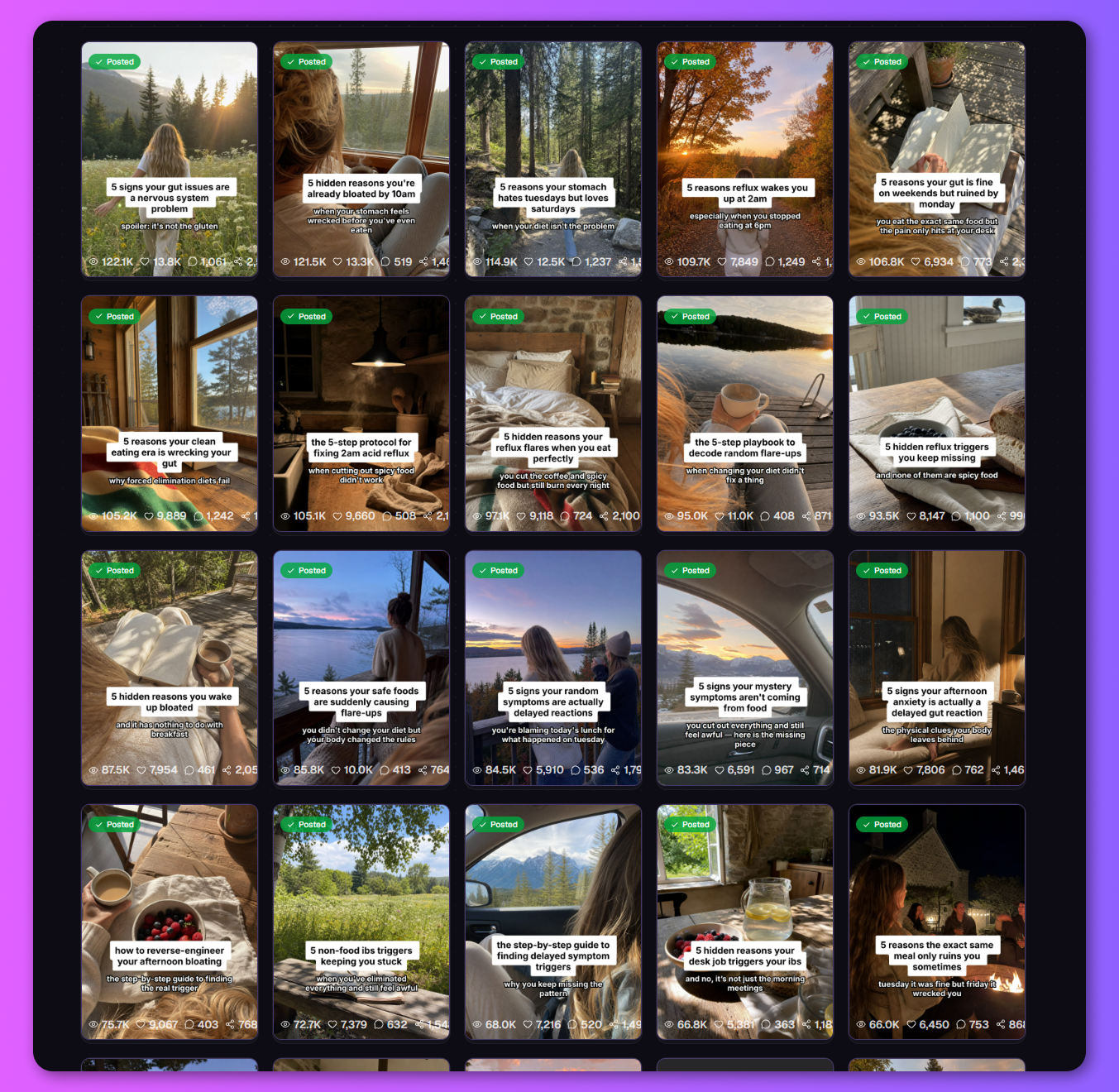
Here's what a few weeks of one automation looks like: a new angle each day, in one look throughout.
Making a single slideshow with AI
Not ready to automate? Make one at a time. Describe the topic in TurboClip and it writes the hook and the slides, makes the pictures and lays out the text. Change any slide's words or picture, then export it at the right size for TikTok.

You can also ask for one from Claude or ChatGPT once you've connected TurboClip, for example "a 6-slide TikTok slideshow on budgeting for students". It plans the slideshow, quotes the price and makes it.
Labelling AI slideshows on TikTok
TikTok asks creators to label AI-generated content that looks real, and it can add the label itself when it detects AI content (TikTok). TurboClip's drafts arrive with TikTok's AI-generated label switched on. It's a setting in the automation's TikTok options; leave it on for anything realistic.
What it costs
Posting on TikTok costs nothing. In TurboClip, each slideshow uses credits, at pay-as-you-go prices like these (US dollars, starting from the cheapest model):
- 10-slide carousels, written and illustrated, for $0.36
- AI images from $0.01 each
You don't need a plan: add credits as you go, or pick a plan for more credits per dollar. See full pricing.
Questions & answers
How many photos can a TikTok slideshow have?
Up to 35 photos in one photo post, according to TikTok's help center.
Can you schedule a slideshow on TikTok?
TikTok Studio can schedule posts you've already made. A TurboClip automation goes a step further. It makes a fresh slideshow for every slot on your schedule and sends each one to your TikTok drafts.
Can you automate TikTok slideshows?
Yes. A TurboClip automation writes, designs and queues a slideshow for your niche on the schedule you set, then sends each one to your TikTok inbox as a draft for you to post.
Does TurboClip post to TikTok for me?
It sends each slideshow to your TikTok inbox as a draft, with its caption. You open TikTok, pick a sound and post, so nothing goes out without you seeing it.
Can I run a faceless TikTok account with AI slideshows?
Yes. Slideshows need no one on camera. An automation keeps the look the same from post to post, and can bring back the same character in every slideshow if you want a face for the account.
Do I have to label AI slideshows on TikTok?
TikTok asks creators to label AI-generated content that looks real. TurboClip's drafts arrive with TikTok's AI-generated label already switched on.