TurboClip vs Arcads

Direct the ad.
Don’t just prompt it.

Both tools generate finished, multi-shot ads. The difference is how much say you get before one is made. TurboClip Director comes before the render — it drafts the brief, the shot list and the script, and you adjust every beat — then the finished spot drops straight into TurboClip Studio to finish and export. Here’s the honest side-by-side.

$1
to make your first ad — no minimum plan
~2.5×
cheaper per credit than theirs
$39
for API + MCP access — their equivalent tier is $595/mo
Side by side

TurboClip vs Arcads

TurboClip compared with Arcads
CompareTurboClipArcads
Cheapest way to start$1 for your first finished ad$119/mo — no lower entry point
Entry plan$15/mo — Starter, 2,500 credits$119/mo — Starter, 8,000 credits ($170 list)
Direction before the renderTurboClip Director drafts the brief, shot list and script — you review and adjust every beat before a frame is generatedNot offered
Built-in timeline editorIncluded — re-roll any shot, retime, add captions, export 1080pNot offered
API accessEvery plan — from $15/moPro only — $595/mo
Unused credits roll overCreator, Pro and AgencyPro only — $595/mo
Beyond adsFaceless videos, slideshows, images and background musicAI ad video
CommitmentMonthly, cancel anytimeMonthly or annual
Mid tier$39/mo — Creator, 7,600 credits$238/mo — Creator, 16,000 credits ($340 list)
MCP (Claude, Cursor, agents)Every plan — from $15/moAll plans

Their cheapest plan costs more per month than our Pro tier — which carries 16,000 credits to their 8,000.

Arcads pricing and features verified July 20, 2026 from their login-gated pricing page, at the promotional rates displayed on that date. Arcads is a trademark of its owner; this comparison is published for informational purposes and implies no affiliation or endorsement.

Beyond the price

Where the real difference shows.

Direction before the render

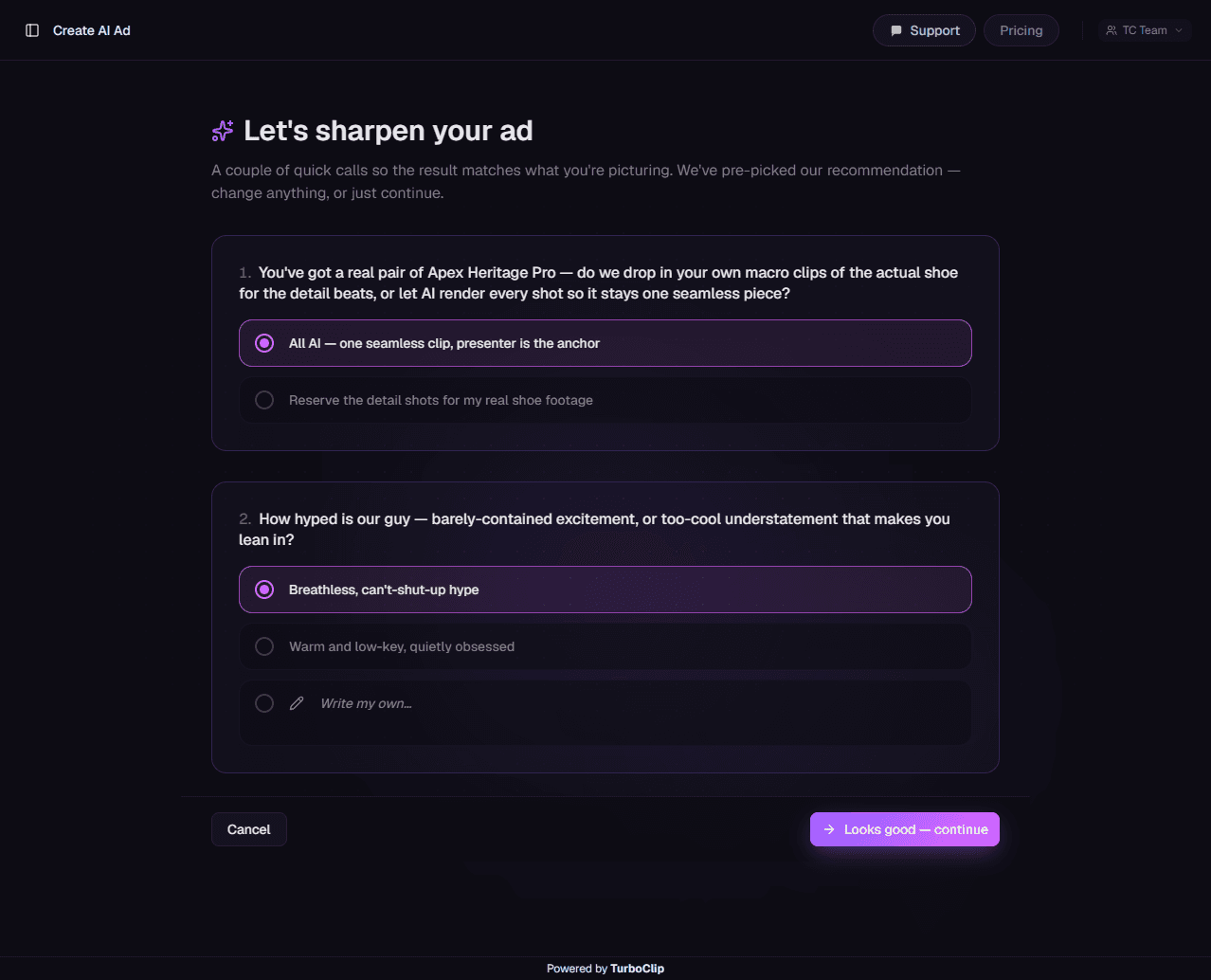
It starts with the questions a seasoned creative director would ask: who this is for, what the offer is, and which objection you need to beat. Your answers become a brief, a shot list and a script you can read and rewrite — so you fix the idea in seconds, instead of discovering it was wrong after the render. Most people end up with a sharper ad than the one they arrived with.

Finish it in the same tab

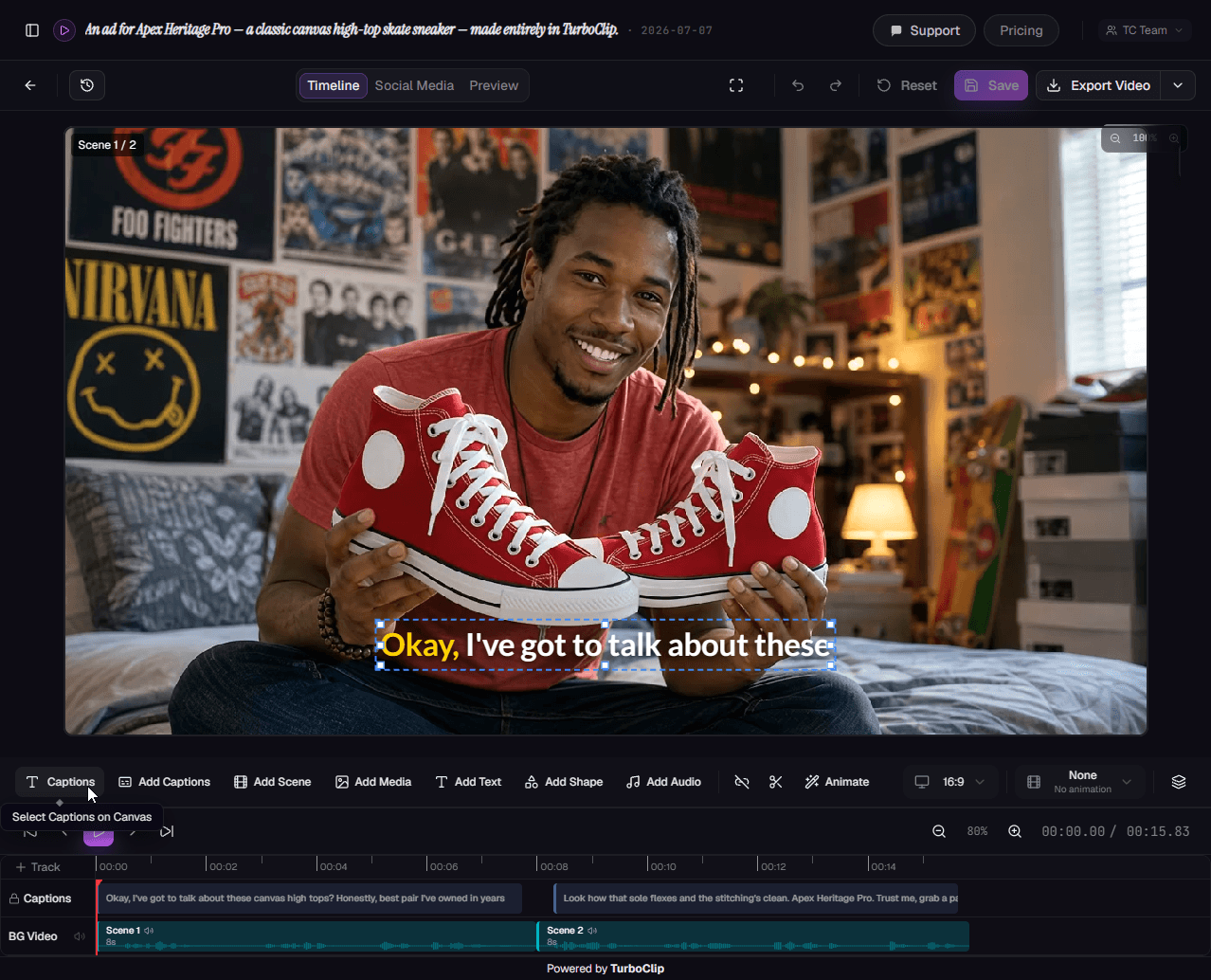
Every ad lands in TurboClip Studio. Re-roll the single shot that missed, retime a beat, add captions and export at 1080p — without exporting to another editor and back.

Your real product, in every shot

Upload it once and it shows up as itself — restaged across any scene, angle or style you ask for, yet unmistakably the same product in every cut.

One studio, every format

The same engine makes faceless videos, slideshows, images and background music, so one subscription covers your whole content calendar — not just the paid-social slice of it.

Example ad · UGC sneaker review

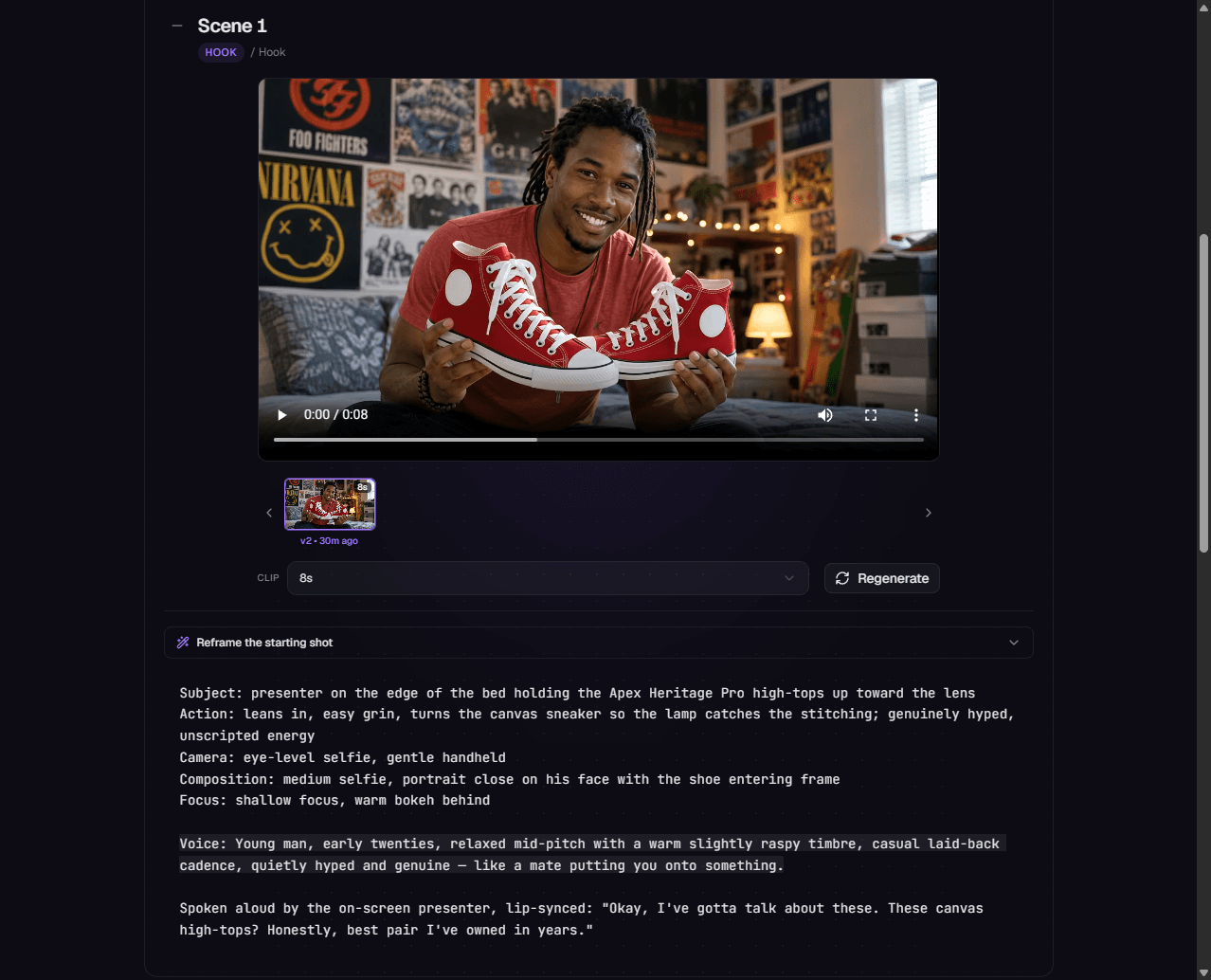
A phone-filmed sneaker review — that was never filmed.

One reference image and one brief became the whole spot — the presenter, the product, the b-roll and every cut — with native spoken dialogue. Not a frame was shot, and no actor was booked.

01

Generate your reference image

The generated reference frame — a skater on his bed holding the sneakers up to camera.

Generate one opening frame — your character, their world, and your real product in shot. It locks the look so nothing drifts: the same face, setting and product carry through every shot the AI writes.

Hands offLocked reference frame
The whole spot

The whole ad,
from a single brief.

One brief becomes the entire spot — hero shots, product close-ups, b-roll and every cut between them — generated together on frontier models, so it reads as a real shoot rather than a montage. You direct it; TurboClip renders it finished and ready to post.

  • Presenter, product, b-roll and the edit — generated as one ad
  • Native spoken dialogue, lip-synced right in the video model
Your real product

Recognizably yours,
in every shot.

Generic AI props kill the sale. Upload your product once and it shows up as itself — restaged across any environment, angle and style you throw at it, yet unmistakably the same product in every cut.

  • One upload, restaged into any scene, style or environment
  • Your actual product in every shot — not a lookalike
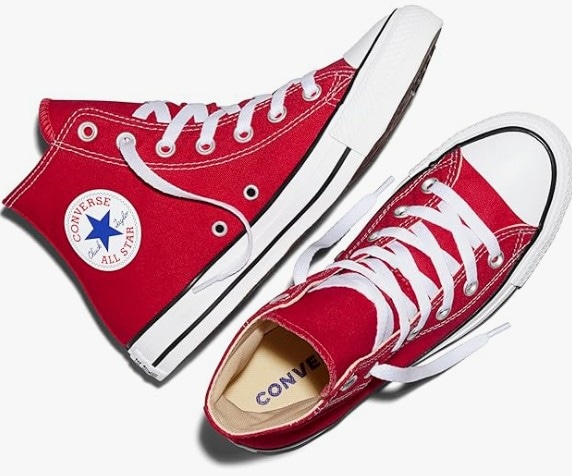
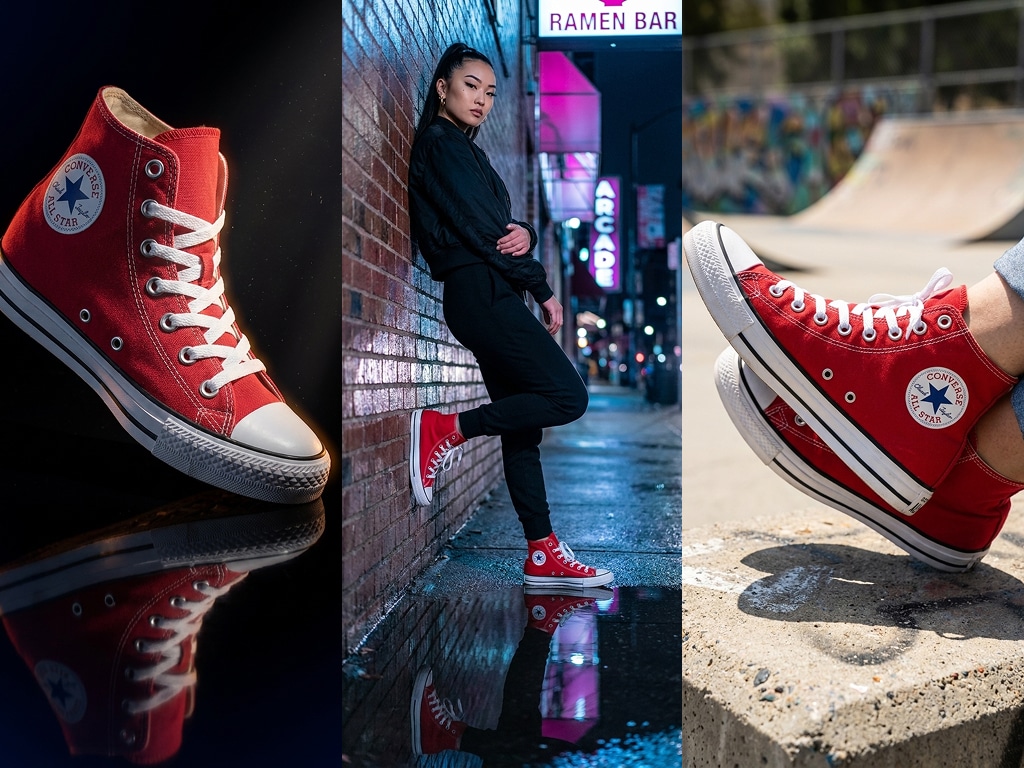
The single product photo you upload.
Your uploadOne product photo
The same product re-staged across three different shots — different environments and styles, still recognizably the same product.
Generated into any environment & style — still unmistakably yours
Under the hood

Powered by the best models in AI.

An AI ad is only as good as the models behind it — so here’s exactly what’s behind ours, by name. TurboClip isn’t a wrapper around one video model: the shot list, the presenter, your product shots and the score each route to the model that does that job best.

Direction
GPT-6 Astra
Opus 5.5 · Gemini 3.1 Pro
Hooks, shot lists and dialogue, written to format
Performance
Seedance 2.5
MiniMax H3 · Gemini Omni Flash · Seedance 2.0 · Kling V3
Presenters who speak natively, in sync
Product shots
GPT Image 2.5
Nano Banana (3 Pro)
Your real product, restaged in any scene
Score
Lyria 3.5
An original bed, mixed under the cut
Every model named here has its credit cost published — price a video before you pick a plan.
One tool, not five

Every model. Every feature.
One subscription.

The newest AI models and a deep bench of production tools — video, ads, slideshows, editing, automation, and agent access — all inside TurboClip. Most tools do one of these.

Script
GPT-6 Astra
Opus 5.5 · Gemini 3.1 Pro
Research-grounded, on-format scripting
Imagery
GPT Image 2.5
Nano Banana (3 Pro)
Styled per scene, up to 4K
Motion
Seedance 2.5
MiniMax H3 · Gemini Omni Flash · Seedance 2.0 · Kling V3
AI video with native audio
Narration
ElevenLabs
50+ natural, expressive voices
FAQ

Questions, answered.

Yes — it’s a whole product. The AI Ad Creator generates complete AI ads — UGC-style spots, product placements, and commercials — where an AI presenter speaks your script to camera, voiced natively by the video model rather than dubbed over with a separate narrator. That native, talking-to-camera delivery is what actually converts.
Start from a brief — describe your product, angle, and audience — or paste your own ad script. The AI plans a timecoded shot list (hook → demo → result → CTA), you edit and approve it, then review each rendered shot on its own and regenerate any one until it lands. No actors, no shoot, no studio day.
Every ad finishes in TurboClip Studio. And because the whole ad is generated, spinning up a fresh hook or angle is just another generation — produce a week of ad creative and A/B test the winners for a fraction of what a single UGC creator or ad-production tool would charge.

Yes. Upload a photo of your actual product and it shows up recognizably — in-hand, on-pack, in use — in every shot, while a single anchor image keeps the same presenter and the same product consistent across every cut. No drifting faces, no morphing packaging.
Flip on Linked Mode and the shots stop being cuts entirely: the whole ad plays as one unbroken, continuous take with no visible seams — the scroll-stopping single-shot look, generated end to end.

Yes. Every ad you generate is yours to run commercially — Meta and TikTok campaigns, YouTube, your website, client work — with no per-use fees and no extra licence to buy.
You own the output, fully. TurboClip never claims rights to what you create, your projects stay private by default, and each ad exports in 1080p, ready to upload straight to your ad account.

Not at all. TurboClip is designed so anyone can go from an idea to a finished video or slideshow without any technical skills. Type what you want, click generate, and you’re done.
But if you want more control, it’s there. Behind the simple starting point are 100+ configuration options — platform, format, tone, audience, pacing, AI models, reference images, data sources, and production notes. TurboClip Studio gives you scene-by-scene control over every detail. Beginners never need to touch these; power users can tune everything.

TurboClip supports all major social platforms including TikTok, YouTube Shorts, Instagram Reels, YouTube long-form, and LinkedIn — with automatic aspect ratio suggestions for each (9:16, 16:9, 1:1, 4:5, and more).
For video, you get 1080p exports with baked-in captions in any aspect ratio. For slideshows, export individual slides as JPG or download all at once as a ZIP archive. Both include AI-generated social media descriptions, hashtags, and cover images to make publishing fast.

TurboClip uses a simple, transparent credit system. Every AI action — scripting, narration, image creation, video animation — has a fixed credit cost displayed before you click generate. No surprises, no hidden fees.
Everything else is completely free: video rendering, 1080p exports, timeline editing, adding overlays, saving projects, and generating social media descriptions never cost credits.

Those tools center on an AI avatar reading your script to camera — you get the talking head, then assemble the ad yourself. TurboClip's AI Ad Creator generates the entire ad: the presenter, your product in-hand, the b-roll, the cuts, and natively-spoken dialogue — from a brief or your own script, editable end to end.
And it all finishes in one place — TurboClip Studio, a full in-browser timeline editor (think CapCut with the features that matter), so there's no export to a separate tool. Pricing is genuinely competitive too. (If you need a digital clone of *your own* face, an avatar tool is the right pick.)
Founder-led support at TurboClip
Founder-led

You'll be talking to the people who built it.

TurboClip is founder-run. Hit a wall, want a feature, or just want a second pair of eyes on your first ad? Real humans answer — not a ticket queue that forgets you by Monday.

You own the copyright to everything you make Private by default We never train our models on your content
No actors. No shoot. No wait.

Your next ad starts with an idea.

Create your free account, bring your brief, and explore the tools for your next campaign. Choose a plan when you're ready to generate.

Free to try · No credit card required